



azadrumana
Inspiring
April 8, 2025
Answered

Setting Shortcut for Default Transection

  • April 8, 2025
  • 2 replies
  • 213 views

Hello Community -

Is there any way I can customise and assign a keyboard shortcut for both audio and video tracks at the same time? Like the one works with right click?
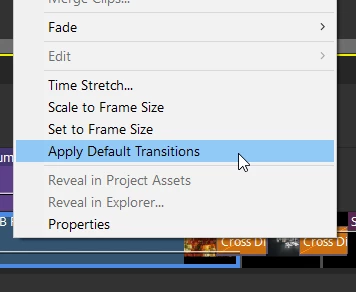
 

I can customise shortcuts but do not work like this one. I want a shortcut like this one. 

Your suggestion would be helpful. 🧡

Correct answer Ann Bens

Open the kbsc and type in transition: there you will find the shortcuts for applying transitions in the timeline.

No need to set your own. They are standard.

Apply Default transition to selection.

2 replies

Ann Bens
Community Expert
Ann BensCommunity ExpertCorrect answer
Community Expert
April 9, 2025

Open the kbsc and type in transition: there you will find the shortcuts for applying transitions in the timeline.

No need to set your own. They are standard.

Apply Default transition to selection.

Community Expert
April 8, 2025

I may not understand, but I think what you want is to change the default transition to what you like.  You do that by opening the transition section, picking one, right clicking and assining it as the default.


Does that do what you want?