


westonh95009669
Participant
November 20, 2017
Answered

Shake Reduction Error

  • November 20, 2017
  • 2 replies
  • 2669 views

Hello everyone,

I'm working on a small project where I used the shake reduction feature on a few clips. I was able to export the project once but now every time since, it gives this error:
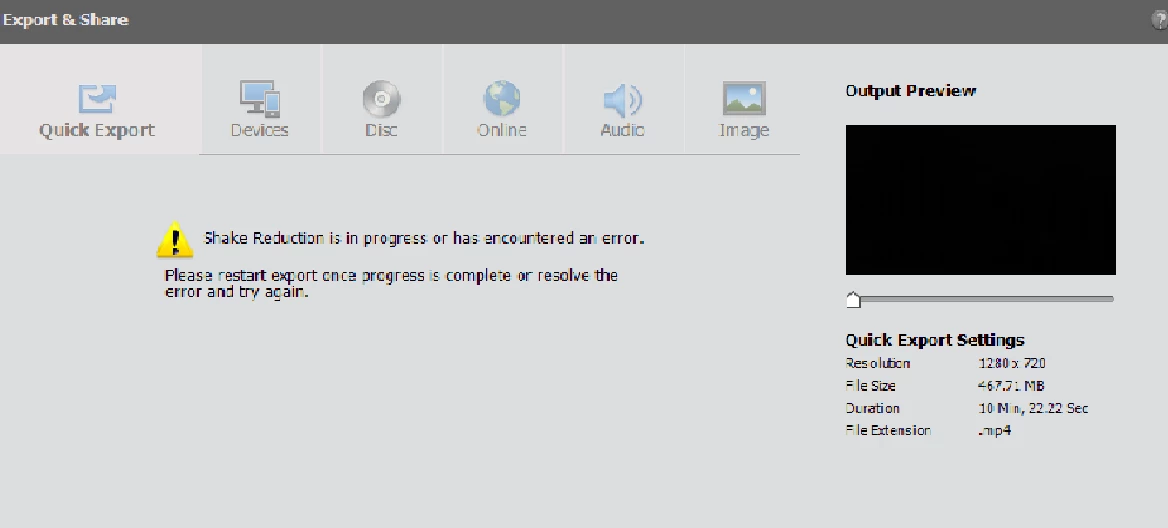
The clips themselves don't claim to be working on shake reduction and I can preview the entire project with out the blue line that says "shake reduction in progress".

I've tried about everything I can think of including deleting the shake reduction from every clip in the project but it still gives this same error. I've closed and reopened the project. Checked project settings. Waited a couple hours with the project open. Even restarted my computer.

Is there anyone that has the same problem and got it figured it out? Or anyone that thinks they know what my problem is?

Thanks in advance,

Wes

    This topic has been closed for replies.
    Correct answer Robert J. Johnston

    If you opened a project that had Shake Reduction applied to any clips, then in Pre 2018 you will not be able to export and share, as you have found out. You will see the Shake Reduction message with no way to continue.

    If that is your case, you can try what I posted in another discussion about how to fix the problem (maybe): Export problem Premier elements 2018

    Robert Johnston

    2 replies

    Robert J. JohnstonCorrect answer
    Inspiring
    November 21, 2017

    If you opened a project that had Shake Reduction applied to any clips, then in Pre 2018 you will not be able to export and share, as you have found out. You will see the Shake Reduction message with no way to continue.

    If that is your case, you can try what I posted in another discussion about how to fix the problem (maybe): Export problem Premier elements 2018

    Robert Johnston

    westonh95009669
    Participant
    November 21, 2017

    I see, very interesting! So I create a project, use Shake Reduction, save and close to finish later and next thing you know I can't export.

    I did remove all the shake reduction, save and close, restarted premiere, re-applied shake reduction, and then was able to export again.

    So lesson learned I guess. Shake Reduction is the last thing you do before exporting. Seems to be a bug - I hope they have an update to fix this in the future.

    Thanks for your help guys!

    Participating Frequently
    August 25, 2018

    Thanks, I am going to make and edit the video then in the end doing the shake reduction.

    let's see

    Legend
    November 21, 2017

    Which version of the program are you using on what operating system?

    What model of camcorder is your video coming from and what is this video's format and resolution? How long is the clip you're trying to stabilize?

    If you look under the program's Edit menu and select Project Settings, what is listed on the General page?

    westonh95009669
    Participant
    November 21, 2017

    Thanks for the reply,

    I'm running the 2018 version on windows 10.

    The footage actually came from 2 different camcorders: Canon G20 and Canon XA25. Both shooting HD 1080 @ 29 frames/second. I have about 5 short clips (long range shots) that I'm trying to stabilize not longer than 10 seconds.

    Here is a screenshot of my project settings:

    Thanks agian!