



gavin1549
Participant
August 10, 2021
Question

Supported GPU

  • August 10, 2021
  • 2 replies
  • 319 views

Any help or advice would be most appreciated.

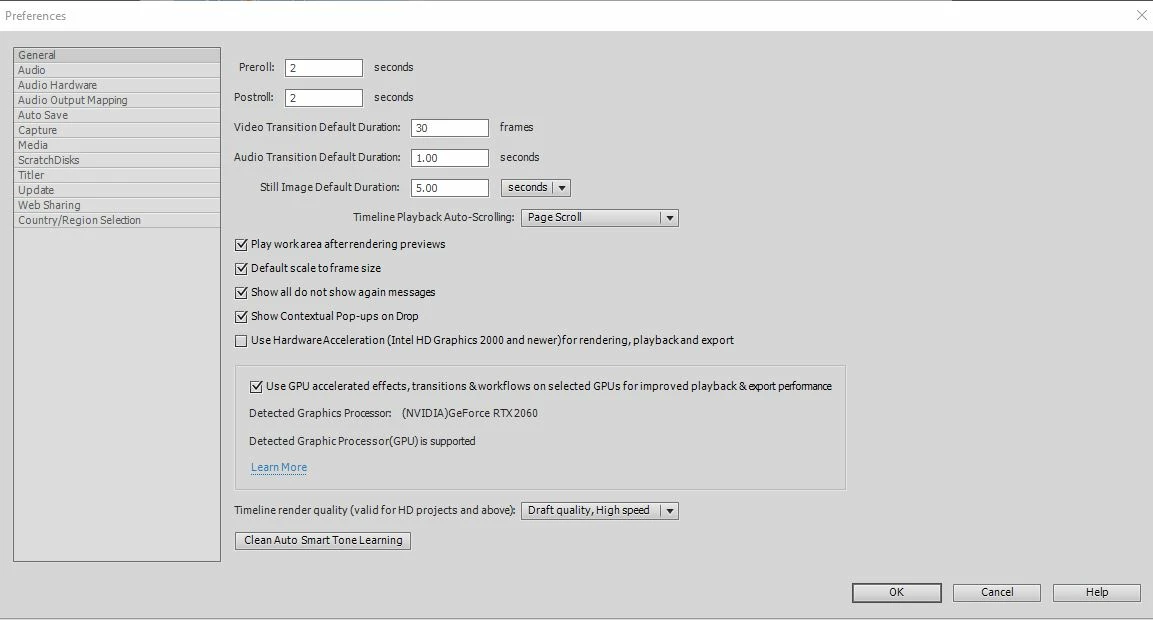
I am running Adobe Premiere Elements 2021,with Nvidia RTX2060 graphics card which is on the list as supported.Driver version "462.59-desktop-win10-64bit-international-nsd-dch-whql"

Under preferences/general in Premiere Elements,Use GPU is ticked.

Detetected Graphics Processor (NVIDIA)GeForce RTX 2060

Detected Graphic Processor(GPU) is supported.

Clean install of any whql studio driver after version 462.59 results in the Detected Graphic Processor(GPU) coming up as unsupported,and therefore not using GPU acceleration.

Is there any way to fix this?

Once again any help would be most appreciatediated
This topic has been closed for replies.

2 replies

Ann Bens
Community Expert
Community Expert
August 12, 2021

Update driver: you are a few behind.

As of now 471.68 studio driver is live.


gavin1549
gavin1549Author
Participant
August 12, 2021

Thanks for your reply Ann,whenever I update the driver through a clean install to 471.68 the message says my Card (RTX 2060) is not supported,although Adobe has this as a recommended card.When I remove 471.68 and go back and install 462.59 it comes up supported.

Ann Bens
Community Expert
Community Expert
August 13, 2021

Ah, for me it was the other way around. The latest driver activated the gpu as a the runner up did not. Go figure.

Glad you got is sorted.

John T Smith
Community Expert
Community Expert
August 10, 2021

Use the driver version that works with the program

gavin1549
gavin1549Author
Participant
August 11, 2021

Thanks for your reply.I will continue using the current working driver.