


Participant
January 27, 2021
Question

Text size of Hold time in Pan & Zoom Tool

  • January 27, 2021
  • 2 replies
  • 352 views

I am using Premiere Elements 2020.


In the Pan & Zoom Tool, when I go to change the Hold Time of an image, the font size is coming out too large so I am not able to see the full 8 digits at once.  See image below If I click in the box I can edit all the numbers by using a cursor key but it doesn't show the numbers as you are doing it so it is a bit hit and miss sometimes when  I want to enter a specific duration.
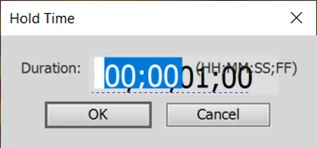
 

Is there anywhere to change this font size to make it easier to know where you are typing?

This topic has been closed for replies.

2 replies

John T Smith
Community Expert
Community Expert
January 27, 2021

This is about a different program, but it may help

Adjusting font size for a high DPI display https://community.adobe.com/t5/Photoshop/Script-way-too-small/td-p/8797196

Legend
January 27, 2021

Where are you finding this setting? In the Pan & Zoom tool I only see settings for hold and pan, but they don't look like your screen cap.


Participant
January 27, 2021

I am in Pan & Zoom,tool and when I double click on the green hold in the left hand corner of the image the box with the time is coming up.


I am still fairly new to using this software so still trying to work things out. 


Legend
January 27, 2021

Which operating system do you have?  What is your monitor's resolution?

Participant
January 27, 2021

I am using Windows 10 on a PC desktop computer and my monitor resolution is 3840 x 2160 which is what it is recommending.