


realityobsessed
Participant
December 27, 2018
Question

Text Styles Not Appearing in Adjustments

  • December 27, 2018
  • 2 replies
  • 845 views

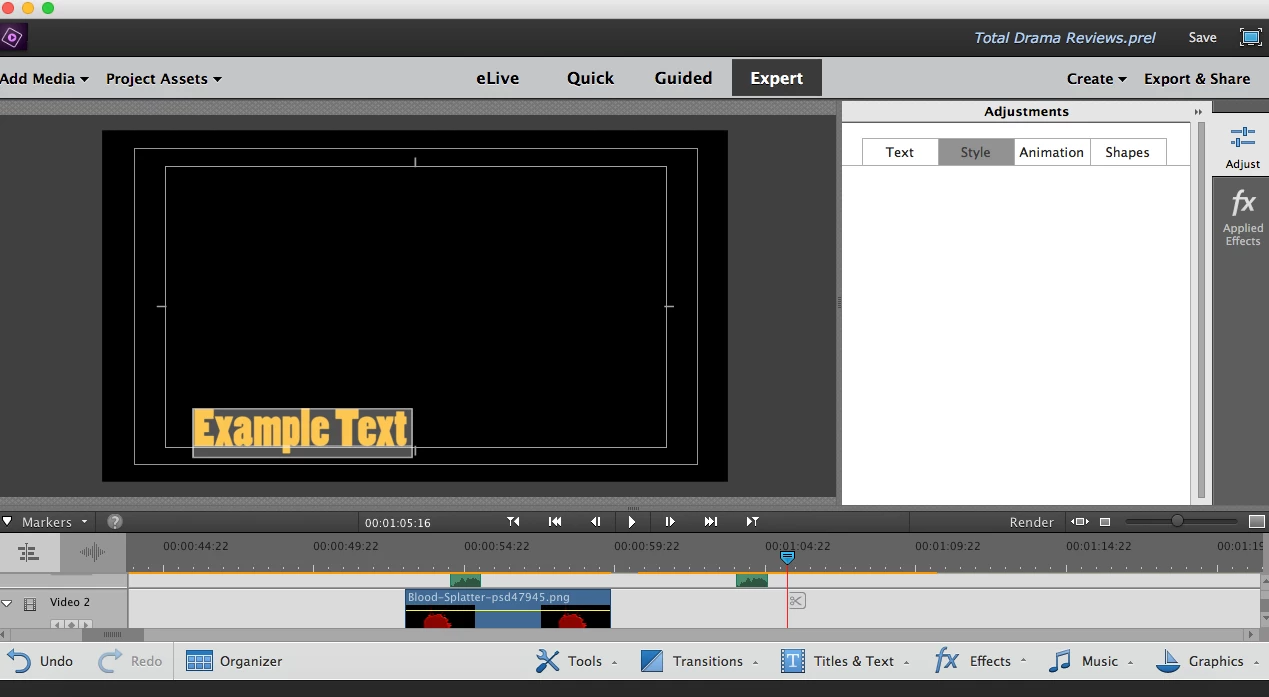
So, I've been using Adobe Premiere Pro for months now, and all of a sudden, when I create a new text box, in my adjustments, my styles will not appear for some reason. Any reason for this?
[Here is the list of all Adobe forums... https://forums.adobe.com/welcome]

[Moved from Encore to Premiere Pro]

    This topic has been closed for replies.

    2 replies

    Peru Bob
    Community Expert
    Community Expert
    December 27, 2018

    Moved to the Premiere Elements forum.

    Community Expert
    December 27, 2018

    Looks like Premiere Elements about version 2018. 

    When odd things like that happen, two things to try are:

    1.  Reset the "preferences" with a press and hold of Alt+Control+Shift (Mac: Option+Command+Shift) immediately after Photoshop Elements begins launching. Click Yes to delete the Adobe Photoshop Elements settings file.

    2.  Deleting and reinstalling Premiere Elements. 

    realityobsessed
    Participant
    December 28, 2018

    I don't have Photoshop on my computer as well, only Premiere Pro. Also, if I was to delete my Adobe Premiere Pro program to re-install it, would it delete any projects I still have on my computer? If so, what could I do to prevent my projects from disappearing?

    Inspiring
    December 27, 2018

    The screen shot you are showing is for Premiere Elements - is that correct?

    The Premiere Elements Forum is here:

    Premiere Elements

    Premiere Pro is a different application.

    MtD