

Known Participant
March 13, 2019
Question

Timeline in a list

  • March 13, 2019
  • 3 replies
  • 896 views

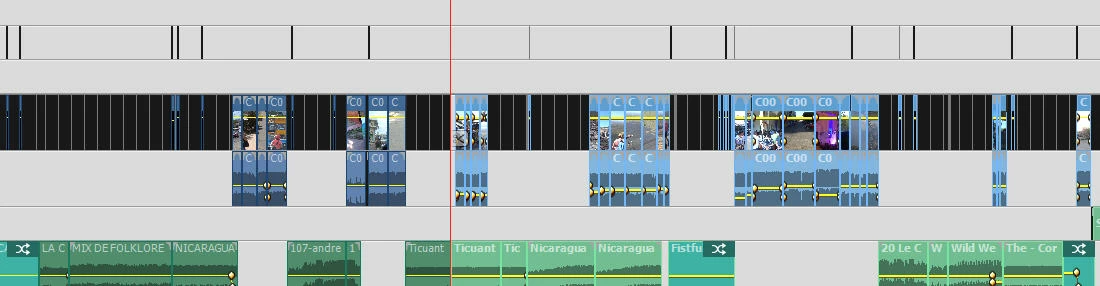
Is it possible in Premiere 15 to show the timeline as a list? See my example. I have to go to the clip to see what audio etc. I used. Or I have to zoom out so check what picture I used in my film. Is there an easier way?

    This topic has been closed for replies.

    3 replies

    Mohammad Tahseen
    Adobe Employee
    Adobe Employee
    March 14, 2019

    I am not sure if I understood your concern here, but for efficiently using timeline having a lot of clips try using "+", "-", "\" after moving the CTI above the clip that you want to navigate. These come from Premiere Pro and I find them very useful.

    Known Participant
    March 14, 2019

    It is not clear for me what you mean with "+", "-", "\" , Mohammed. Can you explain?

    Community Expert
    March 14, 2019

    Koolmees37  wrote

    It is not clear for me what you mean with "+", "-", "\" , Mohammed. Can you explain?

    They are keyboard shortcuts for managing the timeline and how it fits in the available space.

    Legend
    March 13, 2019

    I guess I don't understand what your priority is. Do you just want to read the file names?

    If you're editing a movie that's over an hour long and you want to be able to see the entire movie and be able to read every single file name -- it's just not possible.

    Do you know of an editing program in which you can do that?

    Known Participant
    March 13, 2019

    I think it was in an old version of Pinnacle Studio? Of course my prioriy is the whole film, but when I want to find a picture or clip by file name, than it is not easy.

    Ann Bens
    Community Expert
    Community Expert
    March 13, 2019

    If you hover over a clip with your mouse a popup will show you the filename/start/end/duration.

    Legend
    March 13, 2019

    In version 2019, Quick view displays your timeline as a Storyboard rather than a Timeline, making it easier to move clips around.

    But, no, you can't just see the timeline as a list.

    Known Participant
    March 13, 2019

    I find it annoying that if the cursor is at, for example, 1h15 and I have to search for a photo at 0h40, I always have to zoom in and out to read the file number. There is no better possibility?