


fugachee
Participating Frequently
April 16, 2020
Question

Timeline Playback of only GoPro 60 FPS 4:3 causes distortion in PE 2020 (Other HEVC work)

  • April 16, 2020
  • 2 replies
  • 477 views

When I drop 60 FPS GoPro footage at a 4:3 scale it is distorted in PE 2020. See image. All other versions of HEVC or 60 FPS footage works regardless if it is Iphone or GoPro as long as it is not 4:3 scale and 60 FPS. Weirdly specific error. 


Please help to overcome this error. I purchased PE 2020 after having purchased 2019 just to overcome the HEVC conversion to Handbrake issue. It is weird that only a file in those dimensions has issues. Yes, the handbrake conversion process of the files with issues fixes it.
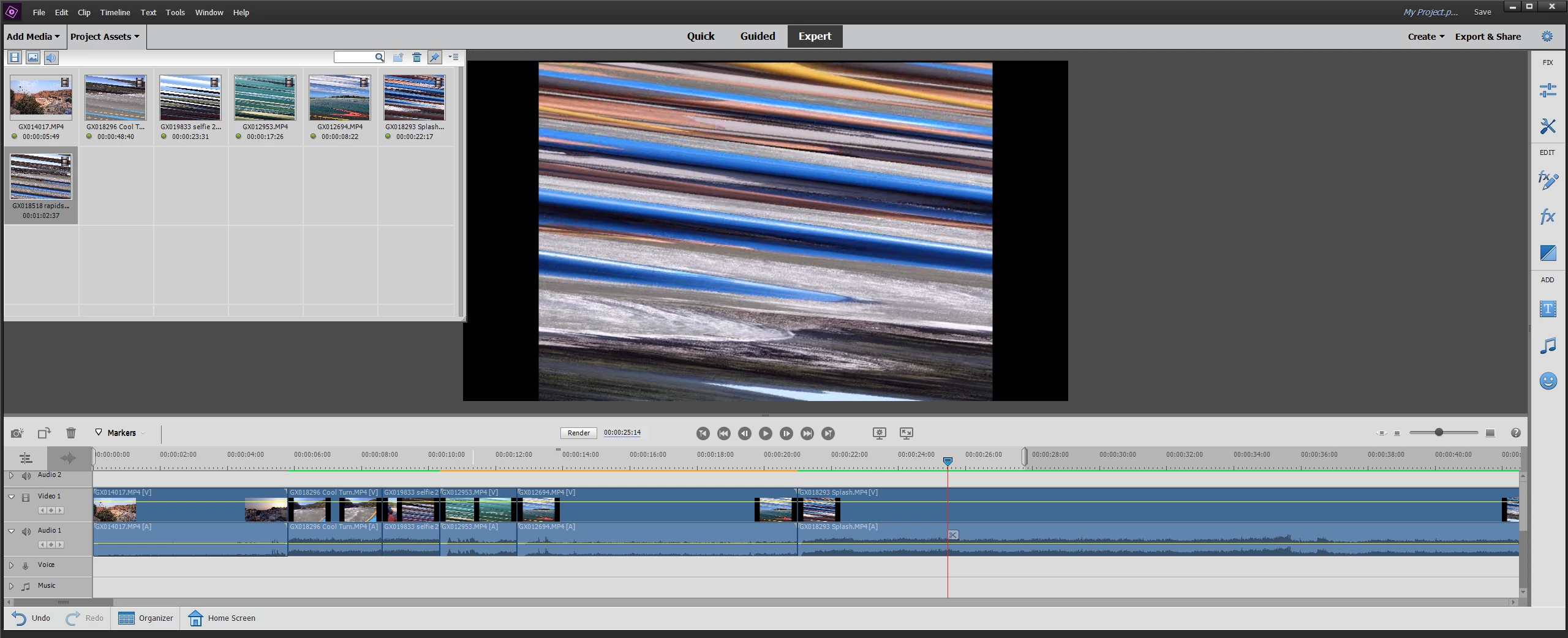


To be clear, I am running PE 2020 in a very capable editing desktop. I just purchased PE 2020 so that I can edit HEVC footage. All of my footage works fine. 

This topic has been closed for replies.

2 replies

Community Expert
April 17, 2020

Sorry for taking so long.  I got your clip hoping I would discover something useful.  I did not find any difference in how it worked in my copy of Premiere Elements.  It is probably not a good solution for you, but it will open in Premiere Pro.  

fugachee
fugacheeAuthor
Participating Frequently
April 17, 2020

Thanks for trying to help. I hope it will be fixed in a future update. I will contact adobe and hope for some support.

Community Expert
April 16, 2020

"When I drop 60 FPS GoPro footage at a 4:3 scale it is distorted..."

 Is it the first clip in a fresh project?  What are the project settings?


If you send me the clip via DropBox or similar, I'll see if I get the same result.


Bill


fugachee
fugacheeAuthor
Participating Frequently
April 16, 2020

Here is a link to one of the clips. As you can see in the thumbnail. It occurs to any clips that are 4:3 aspect ration and 60 FPS HEVC on my computer.


I've tried on a fresh project, continuing project, and all at different timeline settings. So I've tested every variable. However, my current project settings are the standard QFHD 16x9 23.976 setting. 


https://drive.google.com/open?id=1-OFn1TYZ0RH6z44Xu3PwQBd8W3fjOXAu