Participant
December 5, 2019
Answered

Titles timeing

  • December 5, 2019
  • 2 replies
  • 413 views

Is there a way of adjusting the lengt of time a title appears on screen?

Correct answer 150kw

Hi,

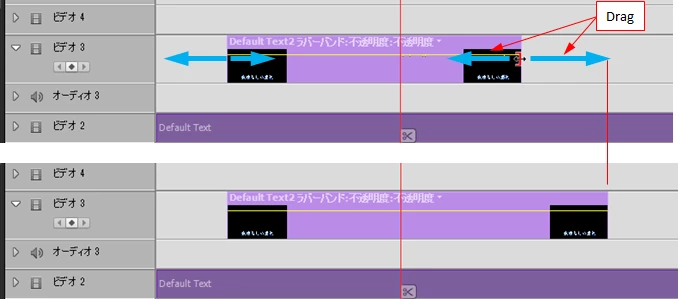
(1) Move the cursor to one end of the title clip.
(2) When the cursor shape changes as shown in the figure, you can adjust the time by dragging to increase or decrease the clip length.

2 replies

Participant
September 5, 2025

After adding the title to Project Assets, Right click on it, click on Time Stretch, then adjust the duration (blue numbers). 

Participant
September 5, 2025

OOps forgot to add. Then drag the title to your video. changing  the time stretch after you have added it to the video will not change the time. You would need to delete the title from the video and start over.

150kw
Community Expert
150kwCommunity ExpertCorrect answer
Community Expert
December 5, 2019

Hi,

(1) Move the cursor to one end of the title clip.
(2) When the cursor shape changes as shown in the figure, you can adjust the time by dragging to increase or decrease the clip length.