


Transform Text not working in Premiere Elements 2018 for Mac
Dear Forum,
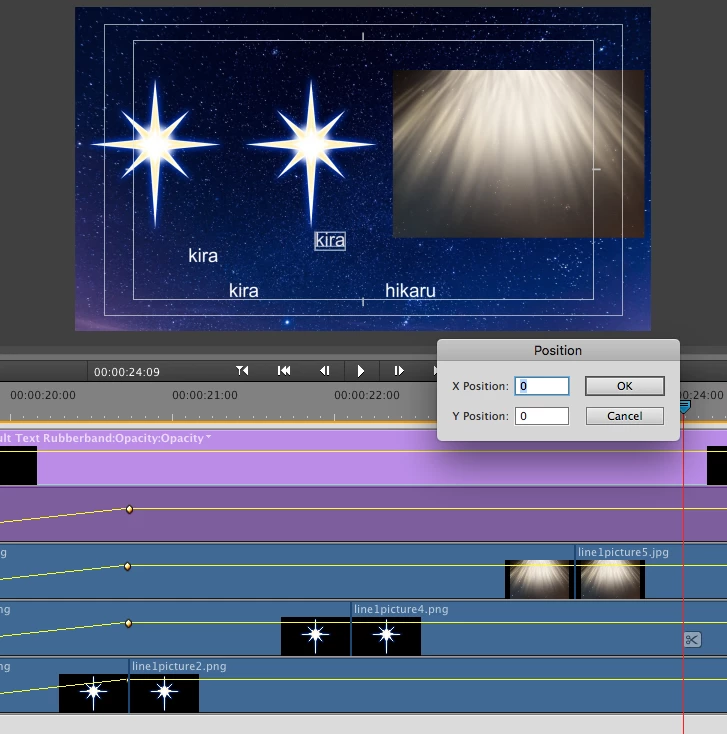
I am trying to reposition text in my video to an exact pixel location and Transform Text is not working. I right click on text, select Transform -> Position and the pop-up says X position: 0, Y position: 0, which is already odd, as the text is not located in the upper left corner. Then when I enter the pixels I want the text to go to nothing happens. I attached a screenshot of what I am looking at.
Here is my computer information:
iMac 21.5-inch Mid 2011
Processor 2.5 GHz Intel Core i5
Memory 8GB RAM
Graphics AMD Radeon HD 6750M 512MB
OS High Sierra Version 10.13.3
Premiere Elements 2018
The file I am working from was created in PE15 for Windows, so I thought this may have been part of the reason, but I opened a new file and tried some Default Text and the same thing happens. I have tried restarting, and next I will try updating my OS. I would appreciate any other recommendation very much, as this feature is crucial to my projects.
Thanks,
Chris
 AdChoices