


Inspiring
April 28, 2021
Answered

Transition effects missing

  • April 28, 2021
  • 1 reply
  • 737 views

Hi,


I use Adobe Premiere Elements 2021 (version 19 in french) on Windows 10. In using the Guide to make a "Transition effect Luminance Fade" in the Video settings section, the Guide ask me along the way to apply the transition in 3 steps. The first one is to drag the transition named "Gradual flap" or "Volet graduel" in french, on the assembly area.


But I didn't find this transition in the the Transition panel. There are many others, but not this one. Is someone has an idea where it can be?


Thank you!
This topic has been closed for replies.
Correct answer Bill Sprague

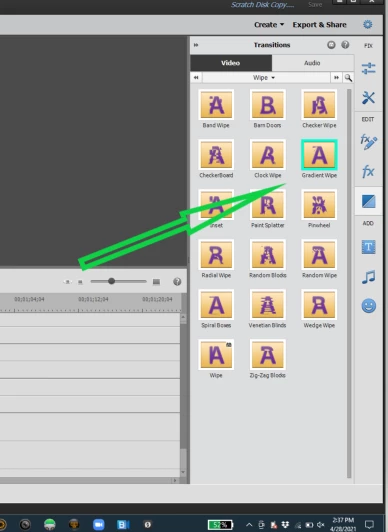
In English it is "Gradiant Wipe".   It should be in the same position on the selection screen.  


1 reply

Bill SpragueCommunity ExpertCorrect answer
Community Expert
April 28, 2021

In English it is "Gradiant Wipe".   It should be in the same position on the selection screen.  


Inspiring
May 6, 2021

Hello Bille Spargue,


Thank you for your answer. The "Gradient wipe" is "Dégradé" in french and it is in the center of the second row:.

So, if it's what they means in the Adobe Première Guide by "Volet graduel", it's a bad translation of "Gradient wipe".


Anyway. I found it with your help. Thank you again!