


Participant
September 22, 2019
Question

Trouble importing and playing Mov video files from a Zoom Q8

  • September 22, 2019
  • 2 replies
  • 1544 views

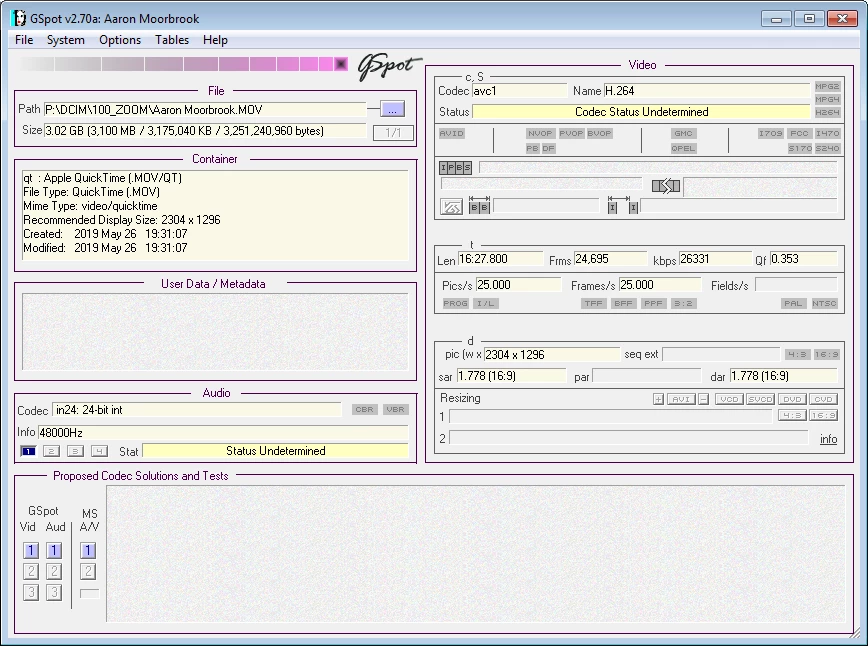
Hi I've tried importing Mov files from the memory card of my Zoom Q8 video recorder. The files won't play and when I try importing them again it says they already exists, after I have deleted them all in the cache and in the saved folder.

This is the Gspot details.
 

    This topic has been closed for replies.

    2 replies

    Participant
    September 24, 2019

    Thanks for your help Steve, I tried Handbrake and it worked up to a point until it crashed my PC the program was using 100%CPU for too long a time.

    Legend
    September 24, 2019
    I have never had Handbrake crash, so I'm not sure what to recommend. If you want to post a sample of your video on a public Dropbox maybe one of us can download it and play with it. But This is a very non-standard video, so there is no one-size fix for your situation unfortunately.
    Legend
    September 22, 2019

    G Spot really doesn't give much information on the file. If you could open the file in the free download MediaInfo we could see much more. Set View in MediaInfo to Text and then copy that report and post it to this forum.


    It would also be valuable to know which version of the program you're editing with and on what operating system.

    Participant
    September 23, 2019
    Here is the Media Info,
    Participant
    September 23, 2019
    General Complete name : P:\DCIM\100_ZOOM\Aaron Moorbrook.MOV Format : MPEG-4 Format profile : QuickTime Codec ID : qt 0000.00 (qt ) File size : 3.03 GiB Duration : 16 min 27 s Overall bit rate mode : Constant Overall bit rate : 26.3 Mb/s Encoded date : UTC 2019-05-25 18:31:07 Tagged date : UTC 2019-05-25 18:31:07 AMBA : Video ID : 1 Format : AVC Format/Info : Advanced Video Codec Format profile : Main@L5 Format settings : CABAC / 1 Ref Frames Format settings, CABAC : Yes Format settings, Reference frames : 1 frame Format settings, GOP : M=1, N=8 Codec ID : avc1 Codec ID/Info : Advanced Video Coding Duration : 16 min 27 s Bit rate mode : Constant Bit rate : 23.4 Mb/s Width : 2 304 pixels Clean aperture width : 2 304 pixels Height : 1 296 pixels Clean aperture height : 1 296 pixels Display aspect ratio : 16:9 Frame rate mode : Constant Frame rate : 25.000 FPS Color space : YUV Chroma subsampling : 4:2:0 Bit depth : 8 bits Scan type : Progressive Bits/(Pixel*Frame) : 0.313 Stream size : 2.76 GiB (91%) Title : Ambarella AVC / Ambarella AVC Language : English Encoded date : UTC 2019-05-25 18:31:07 Tagged date : UTC 2019-05-25 18:31:07 Color range : Full Codec configuration box : avcC Audio ID : 2 Format : PCM Format settings : Little / Signed Codec ID : in24 Duration : 16 min 27 s Bit rate mode : Constant Bit rate : 2 304 kb/s Channel(s) : 2 channels Channel layout : L R Sampling rate : 48.0 kHz Bit depth : 24 bits Stream size : 271 MiB (9%) Title : Ambarella AAC / Ambarella AAC Language : English Encoded date : UTC 2019-05-25 18:31:07 Tagged date : UTC 2019-05-25 18:31:07