


Upload to YouTube settings for photo slideshow with basic animation
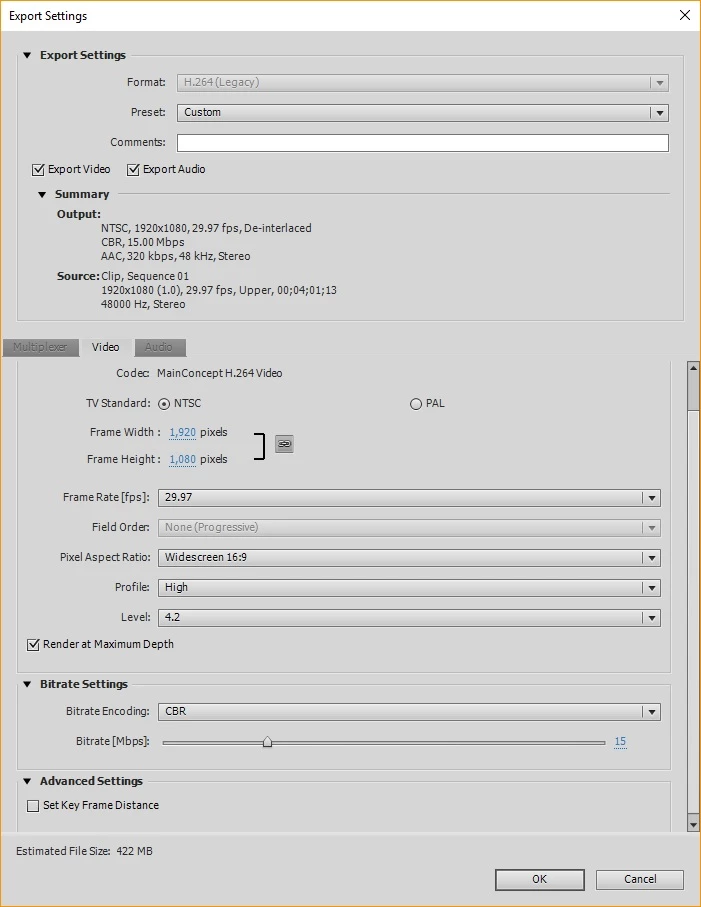
Hi, I am looking to optimize my upload settings for YouTube videos - I want to get the highest possible quality without overdoing it and ending up with unnecessarily huge file sizes. My channel publishes videos of images that scroll along with popular music lyrics. Here is an example of one of my videos: PictureLyrics Brother Iz Over the Rainbow - YouTube. Often there is some basic animation, but not any video. Here are my current settings:
Format: H.264 MP4
Frame rate: 29.97 (this matches the Source, but I'm wondering if I could benefit from a higher frame rate?)
Aspect ratio: 16:9
Profile: High
Level: 4.2
Render at maximum depth: Yes
Bitrate encoding: CBR
Bitrate: 15
Set Key Frame Distance: no
Audio: AAC, Stereo, 48 kHz, High, 320 kbps
I also attached an image of the video settings.
Main questions:
1) Will I benefit from 60fps? The Source says 29.97, but I am not using any video source, only a series of pictures, some of which move across the screen.
2) Will increasing the Level from 4.2 do anything?
3) Are the Bitrate settings appropriate for this content?
4) Any other changes you can recommend to optimize for this type of content?
Thanks for your help!
 AdChoices