


Inspiring
December 14, 2017
Question

Using one MP4 clip simultaneously with another?

  • December 14, 2017
  • 2 replies
  • 408 views

Hello

Is it possible in Premiere Elements 11 to run a MP4 30-second clip with a 30-second countdown timer in the top right-hand corner, so that as the main clip is playing, the timer is counting down simultaneously? When the main clip ends, the timer would be displaying 00:00.

The timer clip is an MP4 file with the following dimensions: 1920px x 1080px at 25fps and the main video clip is the same. Under Export Settings, I have this:
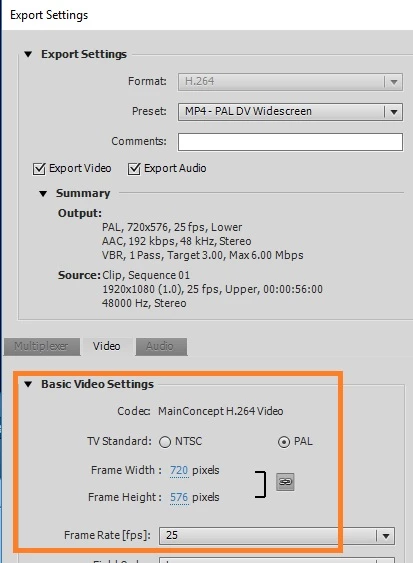
(I have never quite understood why Export Settings shows 720px x 576px (and not 1920px x 1080px.))

The first problem I can see is that the timer clip, since it is the same size as the main clip, will simply cover the main clip in its entirely.

Is there a way to get round this?

Thanks.

    This topic has been closed for replies.

    2 replies

    Legend
    December 15, 2017

    The countdown leader is pretty limited. It can't be customized to count down 30 seconds.

    If you're outputting video for a DVD player, you should NOT be using a custom export. You should be selecting Publish & Share/Disc.

    SteveH59Author
    Inspiring
    December 15, 2017

    Thanks for letting me know about the timer.

    I have tended to save the project an an MP4 halfway through and then, when it is finished, I choose the Publish & Share option. I save it as MP4 halfway through just to give me an idea, outside Premiere Elements, how the finished movie will play on the final DVD.

    Legend
    December 15, 2017

    I'm not sure why you are using those obsolete export settings. What are you planning to do with your video after you export it? There are likely better options, depending on what your goals are. Meantime, your export settings have nothing to do with adding this countdown.

    There is a countdown leader available in the Windows version of Premiere Elements. You get to it by clicking Panel Options in the upper right of the Project Assets panel. You can then add this countdown to an upper video track, over your video, and resize and position so that it's in the upper corner of your movie.

    However, it may not be what you are looking for. It sounds like want a digital-only countdown. If that's the case, Premiere Elements can not do this.

    SteveH59Author
    Inspiring
    December 15, 2017

    Hello Steve

    The timer in Project Assets looks fine. I can't customise it so that it begins at 30 seconds, can I?

    Those Export Settings were put in place by the software itself. The aim is to save and burn the project to a blank DVD (R) or DVD (RW) for playing back on a TV DVD player.

    Thanks again.