


Participant
August 22, 2017
Question

Varying quantity of frames per second

  • August 22, 2017
  • 1 reply
  • 386 views

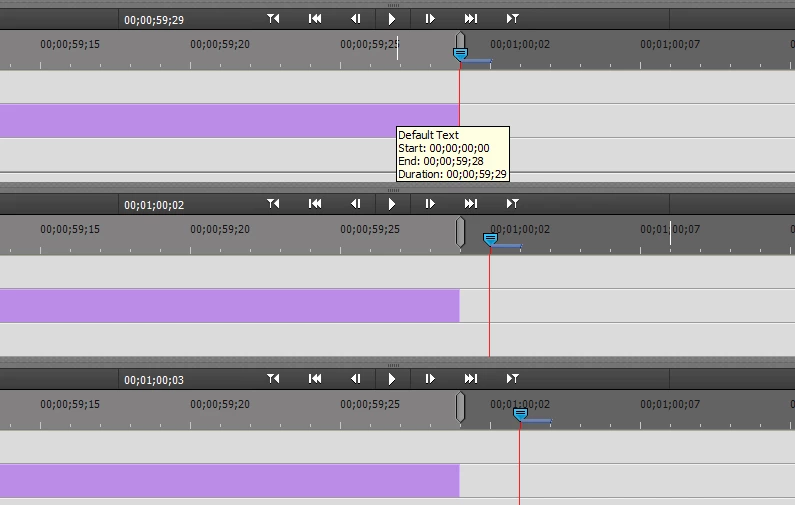
Why looks like the timeline has hide/lost frames sometimes? My screen capture shows three points from same timeline.

At first (top side) there was 00;00;59;29. Next frame (middle) has time 00;00;01;02 and last one (bottom) has time 00;00;01;03

So I think that frames 00;00;01;00 and 00;00;01;01 are missing.

Windows 7 PRO + Premiere Elements 14

Have I done something wrong with settings or elsewhere?
This topic has been closed for replies.

1 reply

Known Participant
November 2, 2017

This article explains the issue: Choosing the Timecode Display Format | Working with the Timeline in Adobe Premiere Pro CC | Peachpit

It has to do with typical cameras taking video at 29.97 frames per second, not 30. So in order to compensate for the time difference, "drop-frame timecode skips ahead two frames every minute except for every tenth minute."

You can choose the display setting in Edit->Project Settings->General->Display Format, change to Non-Drop-Frame Timecode to see all frames.