


Participant
January 14, 2017
Answered

Video not visible after uploading to PreEle11

  • January 14, 2017
  • 2 replies
  • 300 views

My video isn't visible after I upload the file to Premiere Elements 11.  It doesn't seem to be a codec problem as I checked G-Spot and it says correct audio and video codecs are installed.  The avi files play fine on G-Spot and the Movies & TV applications.  I recently got the new laptop and the problem may be related to something on it as my old Windows 7 laptop didn't have this problem.

Would you please help me?

System info:

Windows 10 Home OS

.avi file type

Premiere Elements v 11.0
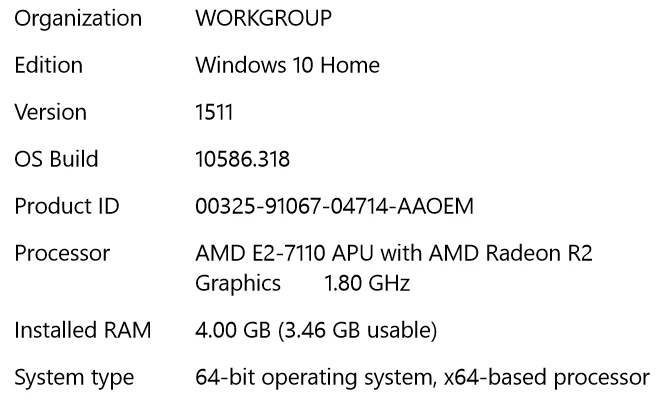
    This topic has been closed for replies.
    Correct answer Steve Grisetti

    It's an AVI using the H.264 codec -- which doesn't sit well with Premiere Elements.

    Easiest solution is to run it through the free download Handbrake and convert it to a 1280x720 MP4.

    2 replies

    Steve GrisettiCorrect answer
    Legend
    January 15, 2017

    It's an AVI using the H.264 codec -- which doesn't sit well with Premiere Elements.

    Easiest solution is to run it through the free download Handbrake and convert it to a 1280x720 MP4.

    jaromwAuthor
    Participant
    January 16, 2017

    Thanks Steve!  Converting to MP4 worked great.  Now I have another problem-PreEle11 crashed when I tried to burn my disc, but I'll post something separately for that.

    Thanks again

    Legend
    January 14, 2017

    What codec does G Spot report the file uses and what format is the file?

    What model of camcorder did the video come from?

    Also, do you have Quicktime 7 installed, per the program's system requirements? It provides important codec information for version 11 of the program.

    jaromwAuthor
    Participant
    January 15, 2017

    Steve, thanks.  I use a Kodak Zi8 hand-held camcorder.  Quicktime v7.7.9 is installed on the laptop.  Here is the G-Spot file analysis: