

azadrumana
Inspiring
October 25, 2022
Question

Volume Adjustment Do Not Work 2023

  • October 25, 2022
  • 1 reply
  • 694 views

A very important feature is volume level adjustment through keyframe timeline. It feels like that went missing. When I take a audio track, mark different segments with keyframe and set volume levels, it do not work. Funny part is, 2 volume option turns up when you right click on the track -
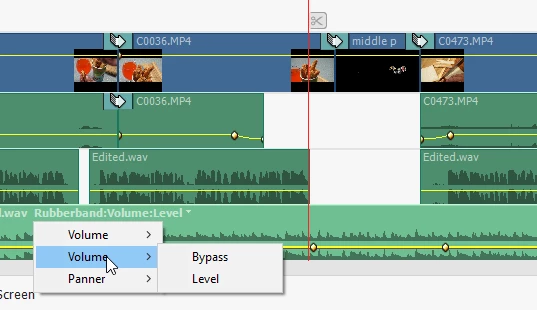
Volume level control is a very important feature and this went missing! I am not sure what is wrong with Adobe Premiere Elements team, but they are not doing good. Sorry for the criticism but you really need to work hard to make things right. 

This topic has been closed for replies.

1 reply

Adobe Employee
October 26, 2022

Hi, 
    Can you share a screen recording of the adjustments you are trying to do in PRE along with details of audio you are editing. There might be some issue in the project as this feature is working fine.

azadrumana
Inspiring
October 26, 2022

Hi @FawadAli 
As you may have noticed that I mentioned PRE 2023 on the title. Are you on the same version?


Also I have shared a screenshot, which clearly projects 2 Volume sub-menus on the pop-up menu. You are not getting that?


I checked with different projects in 2 different PCs, same issue.


By the way, it is on Music track, did not check with other tracks.


Quite upset with how they have broke things in order to fix it.

Adobe Employee
October 26, 2022

Are you trying out it in Classic View or Audio view ?