


Participating Frequently
November 1, 2023
Answered

Volumen justment

  • November 1, 2023
  • 2 replies
  • 359 views

Hello

How can I make a justment in audiotrack (music) on a specific place in the musictrack to increase the music after end of a narration and I want to have a higher level of the music, and later on decrease the music when the naration begins again. I know that a yellow horizentally line can move up and down to change the level, but I want to mark on the wantet place to make a dor from where I can increase og decrease the soundlevel. How is the procedure to make that dot on the yellow line?

Knud
This topic has been closed for replies.
Correct answer Bill Sprague

Yes it is possible to explain in words.  I think it might be easier to watch a 'keyfram' tutorial, but I'll test my writing skills.  


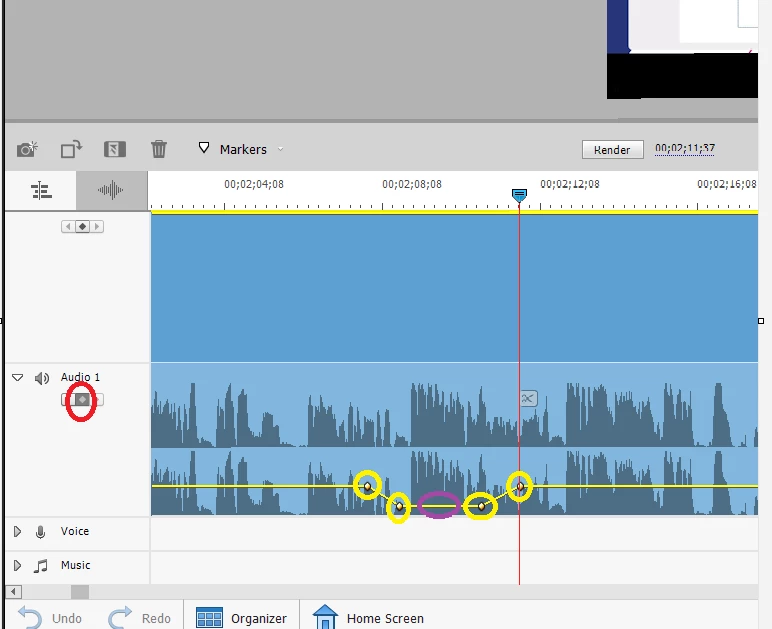
With the audio track selected, you set the cursor where you want the first keyframe poke the keyframe button that is circled in red.  Do it three more times so that you have four keyframes that are circled in yellow.   You can move the key frames as necessary by dragging and dropping.  You can now grab the yellow audio volume line, circled in purple, to move the the volume up or down for that section. 


2 replies

Peru Bob
Community Expert
Community Expert
November 1, 2023
Community Expert
November 1, 2023

You use "keyframes".  Rather than try to explain it, search YouTube for "Premiere Elements Keyframes".

Participating Frequently
November 1, 2023
Hej
Is it not possibly to explain words ?
or link to illustrations ?
Knud
Bill SpragueCommunity ExpertCorrect answer
Community Expert
November 1, 2023

Yes it is possible to explain in words.  I think it might be easier to watch a 'keyfram' tutorial, but I'll test my writing skills.  


With the audio track selected, you set the cursor where you want the first keyframe poke the keyframe button that is circled in red.  Do it three more times so that you have four keyframes that are circled in yellow.   You can move the key frames as necessary by dragging and dropping.  You can now grab the yellow audio volume line, circled in purple, to move the the volume up or down for that section.