
Participant
May 30, 2023
Answered

When I change the overlay text of one clip, the other also changes

  • May 30, 2023
  • 1 reply
  • 211 views

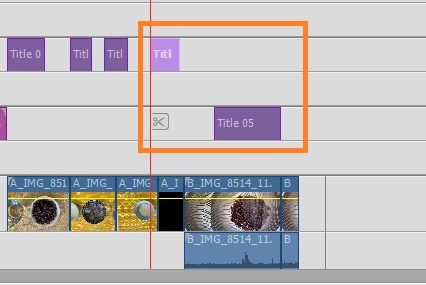
I dont know what I am doing wrong, when I change one of the overlay text, the other also changes and vice versa, both the overlay texts are highlighted in this orange box... can someone advise please...


This topic has been closed for replies.
Correct answer Steve Grisetti

This is because you re-used or copied the title. This creates a clone and when you change one title it changes every copy.


To create an unconnected copy, right-click on the title in the Project Assets panel and select Duplicate. Then add that to the timeline. Duplicates are not clones and changing one duplicate will not change the other.

1 reply

Steve GrisettiCorrect answer
Legend
May 30, 2023

This is because you re-used or copied the title. This creates a clone and when you change one title it changes every copy.


To create an unconnected copy, right-click on the title in the Project Assets panel and select Duplicate. Then add that to the timeline. Duplicates are not clones and changing one duplicate will not change the other.

Participant
June 6, 2023

Thanks a lot! This solved my problem 🙂