


Participant
March 2, 2023
Question

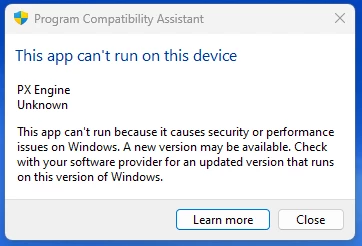
Win 11 install- PX Engine?

  • March 2, 2023
  • 2 replies
  • 8950 views

I have Premiere Elements 14 installed and activated on my old computer with Windows 10. Got a new computer (Win 11) and installed it. It installed and actually run but I get the PX Engine error and an activation error. And it won't run on my old computer now either- also an activation error.  Spent 30 minutes online with agent who told me it won't run with Win 11.  But I've seen others claim to install and run it successfully via admin. She had me uninstall it on both machines and reinstall but it won't work on either now. Anyone know if there is a PX Engine driver update? I can't find anything about that.   
2 replies

Participant
October 4, 2025

Found a fix! Relates to how it checks the DVD for validity by adding an unneccessary driver. See solution here Core Isolation, Memory Integrity - Microsoft Q&A

Peru Bob
Community Expert
Community Expert
March 3, 2023

PX Engine is related to the DVD burning engine and can't be updated to work on Windows 11.


Bel P
Participant
April 12, 2023

Thank you.
Been having issues with my laptop and had to re-install both Premiere and Elements and gettting the same error. 
I've had it with adobe. I'll keep eking along with my LR 6.14 as long as I may, but not going to a subscription model. 
Time to get better at my alternative editing programs.