ThE MessengEr
Participant
January 23, 2020
Question

Yellow Render line on new project

  • January 23, 2020
  • 1 reply
  • 245 views

Good evening everyone, 

In PrE 2019, Im trying to edit parts of a video found on Youtube.

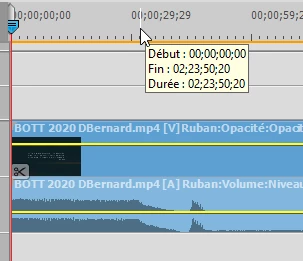
Before going further in the project, I noticed that the render line remains yellow all along the video track, suggesting the project settings don't match the imported video.

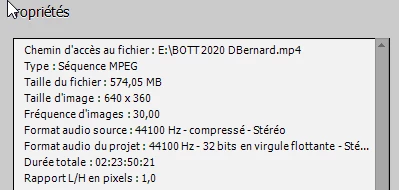
Despite applying different settings to the project, nothing seems to work, I even tried several NTSC settings, since the video was shot in the US, but nothing seems to fit that video format.

The goal is to re-upload that project with a dubbed audio track, any idea which settings could be used ?

Here are the specs : 


Thanks ! 


This topic has been closed for replies.

1 reply

Community Expert
January 23, 2020

The render line is an indicator that the previews don't match the project setting.  If your computer is strong enouhg that editing is going smoothly, you can ignore it.  If you "render" the project, editing might go more smoothly.   

At final export to the finished video, everything is reread and coded (or 'rendered') from scratch.   

Try it to see how export quality works for your project.   

ThE MessengEr
Participant
January 24, 2020

Will try that, thank you for the help.