


Participant
May 24, 2020
Question

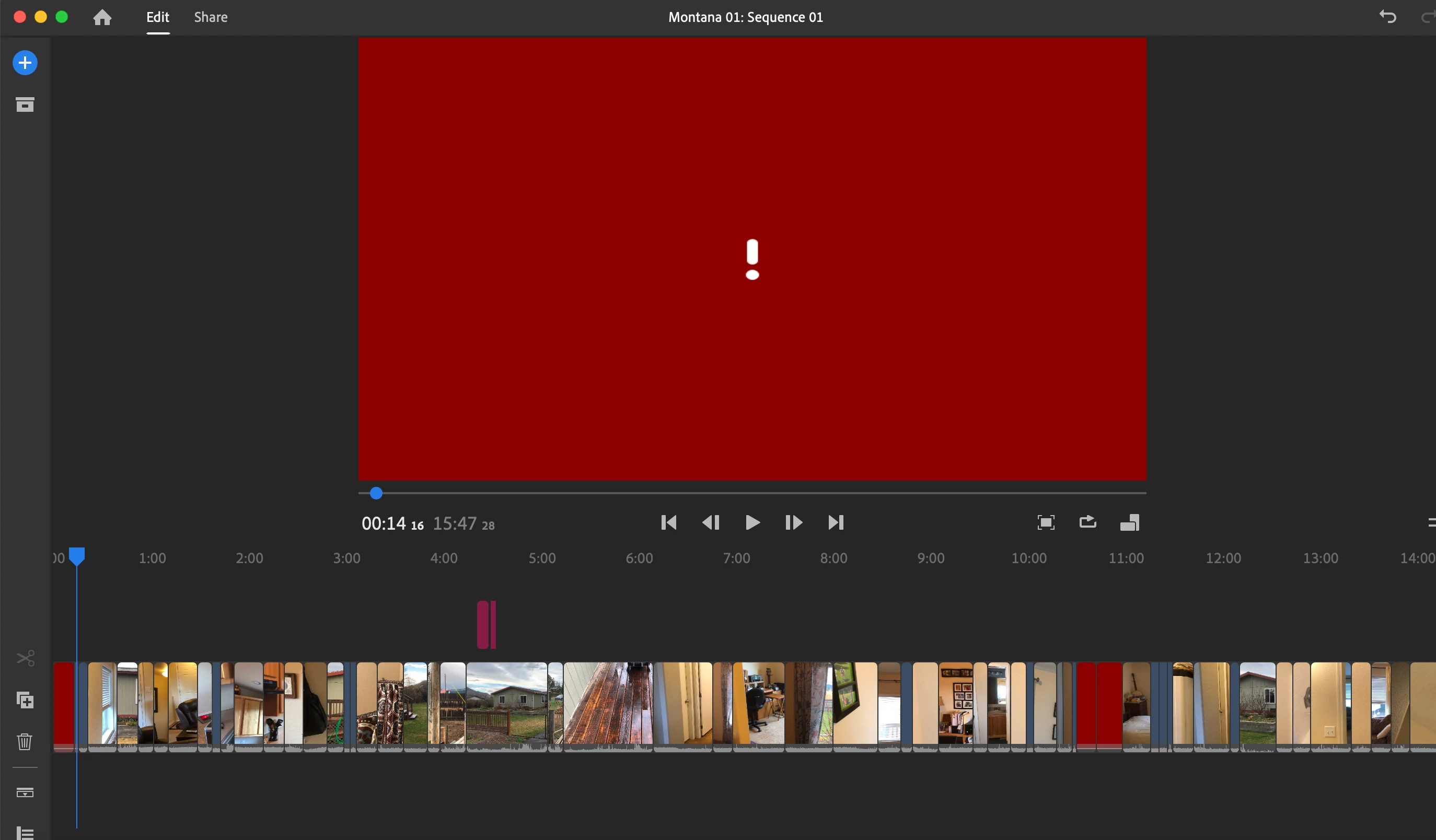
A few shots missing on timeline when synching

  • May 24, 2020
  • 2 replies
  • 410 views

Hi there,


I created a project on my iPhone 8.  I want to finish edit it on my macbookpro.  When opening my project on the computer, about 5 shots out of 70 are missing and appear in red.


I tried closing and reopening the projects on both sides (iphone and mac), but to no avail, I still get some missig shots.


Why are these shots present on my iPhone time line, but not on the computer timeline?
This topic has been closed for replies.

2 replies

Kartika Rawat
Community Manager
Community Manager
May 26, 2020

Hi there!

We're sorry about the syncing issue. Could you try to sign out and back into your Creative Cloud account? Also, you can see on Cloud Storage if File syncing is up to date. Attached image for reference


Let us know.

Thank you,

Kartika


Legend
May 25, 2020

Where are these missing media files located? On your computer or in the Cloud?