


Baseline audio shift
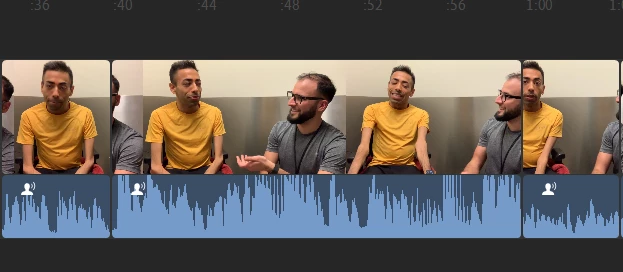
When I cut out a small piece of the clip (1 or 2 frames) by dragging either end of it, the clip I am editing will get an inexplicable baseline audio shift upwards. The audio panel does not show any change, so I have no control of this. Undo does not change the audio levels back to where they were. I would have to reinsert the entire file again and redo all my cuts.
You can see in the attached screenshot that the audio for the middle clip is much higher than the one to the left and the right, because this just happened to the center clip. The audio is roughly the same for all 3 of them (the cuts are in between one longer clip) but the middle one has an inexplicable baseline audio shift upwards.
Using video files captured with iPhone XS, uploaded to Google photos, and then downloaded onto a Windows 10 PC.
 AdChoices