


chivsjawn
Participant
December 10, 2018
Question

Can't Download Rush CC, but I meet system requirements

  • December 10, 2018
  • 1 reply
  • 1428 views

Hey all, I'm trying to download Premiere Rush CC, but it keeps saying I need to update my OS.  But I'm up to date, have updated the OS a few times, made some extra room on the hard drive. 

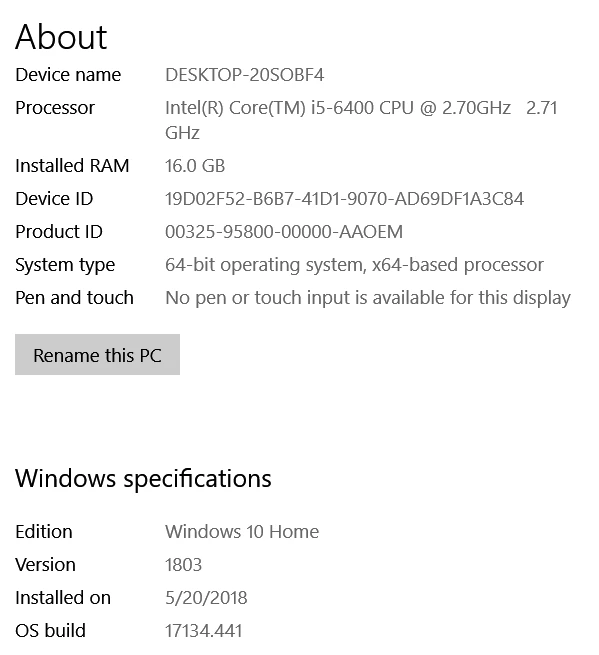
Quad core, 16 GB of RAM, 64 bit, and v. 1803 on Windows (screen shot below).  I read another thread where someone restarted Windows and it worked fine, but I'm tried that a few times, still a no go. 

Any ideas?
This topic has been closed for replies.

1 reply

Participating Frequently
December 10, 2018

Hi chivsjawn,

Sorry for the trouble.


Did you try signing out/in the creative cloud account ?

Mayjain

chivsjawn
chivsjawnAuthor
Participant
December 10, 2018

When you say "signing out/in the creative cloud account" do you mean in the browser, or a desktop client? 

caroline_edits
Community Manager
Community Manager
December 10, 2018

In the desktop app, please!

Also, I'm seeing a little bit of confusion here. I see that you installed your OS on 5/20/2018, and I know that a new update came out in October, as seen here: https://support.microsoft.com/en-us/help/4028685/windows-10-get-the-update

But I understand you've updated your OS a few times! I believe this is where the miscommunication is happening. Maybe the automatic "Check for Updates" feature is failing you. Here's a link on how to manually update your OS: Manually Check and Install Windows Updates - Help Centre

I hope this is helpful!

-Caroline