Participant
February 3, 2021
Answered

Can‘t seperate audiotrack from video

  • February 3, 2021
  • 1 reply
  • 3122 views

Thats my problem


I'm using Premiere Rush on my iPad Pro 4th Gen. - iPadOS 14.3

Premiere Rush Version: 1.5.48


When I'm holding my finger on the videopart I am seeing this:
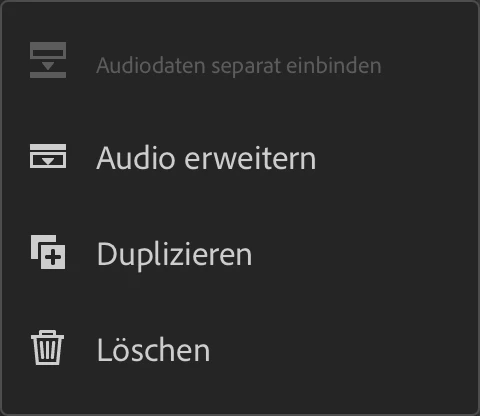
 

I do not know why it is greyed out.

Normally I am recording with two different audiotracks and when I'm importing the video in Pro I also have two - but in Rush only one, where both tracks are connected. Maybe the connection of the tracks is the problem?

Sorry for my bad english - I hope you guys can help me solving this problem
This topic has been closed for replies.
Correct answer petergaraway

Yes

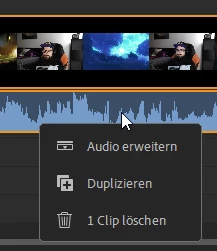
I tried it on my PC with Win 10. Same issue but on my PC there is no area which says something like "seperate audio"...I have just these options:


On my iPad Pro I can see the following:


So I have two videos, one with 1 audiotrack und the other one with 2 audiotracks and no one can be seperated. Neither on my PC, nor on my iPad. When I'm using Premiere Pro on my PC I have no issues. Both videos are .mp4 files. 


Let me know if you need more information. 🙂


Hi Gabrial,


Sorry for the confusion. I'm assuming this is happening because your clips have multi-channel audio. Rush only supports separating mono and stereo audio. 


Can you confirm that's the case?

Thanks! 


Peter 

1 reply

anissa_thompson
Community Expert
Community Expert
February 4, 2021

Hi there...  The only things I can think of are:

  1. Are you sure you've selected the media you want to split? (It's easy to accidentally tap on a nearby track and lose the focused/intended selection.)
  2. Are you sure the media you selected is a VIDEO track that has audio? The clip will automatically be greyed out if it is actually an image and not a video...


Hope this helps!

Hope this helps! Make sure to press "✔ Correct Answer" on this post if this answers your question. Happy Creating!Anissa • @anissat
Participant
February 4, 2021

Hey, thanks gir the respons 🙂


Yes, Im sure I selected the right media. The only one I imported was the Video.

Maybe some issues with .mp4 files? I tried a video with just one audiotrack - same result. Cant split it 😕😕

anissa_thompson
Community Expert
Community Expert
February 4, 2021

Usually when we come across these kinds of issues, we'll next try repeating the issue with different content. Do you have another clip you could import and test?


Would you be able to screencapture or use another device to record your process? Unfortunately, beyond what you've already stated, I feel like we don't have all the right details to make a determination...

Hope this helps! Make sure to press "✔ Correct Answer" on this post if this answers your question. Happy Creating!Anissa • @anissat