


Inspiring
February 13, 2019
Answered

Deleting audio tracks added in another program

  • February 13, 2019
  • 1 reply
  • 503 views

I have imported video into a Rush project that was edited and had audio added (I believe) in Final Cut Pro.

Is there a way to delete the audio track? When I click on the audio track, both the audio and video are highlighted. If I press delete, both are deleted.

I suppose I could just shrink and turn off the sound on the track, but this is a group project and I wanted to clean it up before adding new audio. .
    This topic has been closed for replies.
    Correct answer Meg The Dog

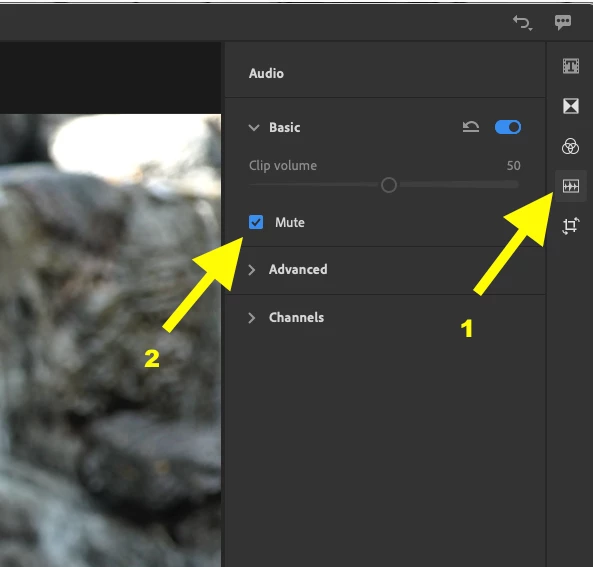
    Select the clip on the timeline. Press the Audio Button, then press Mute. The audio waveform of the clip will turn from blue to gray, indicating it is muted:

    MtD

    1 reply

    Meg The DogCorrect answer
    Inspiring
    February 13, 2019

    Select the clip on the timeline. Press the Audio Button, then press Mute. The audio waveform of the clip will turn from blue to gray, indicating it is muted:

    MtD

    adieuAuthor
    Inspiring
    February 13, 2019

    Thanks for that, Meg. I had muted it, but thought there might be a way to delete it. Clearly there isn't. Cheers