
Participant
June 14, 2024
Question

Deleting unused assets glitch
  • June 14, 2024
  • 2 replies
  • 339 views

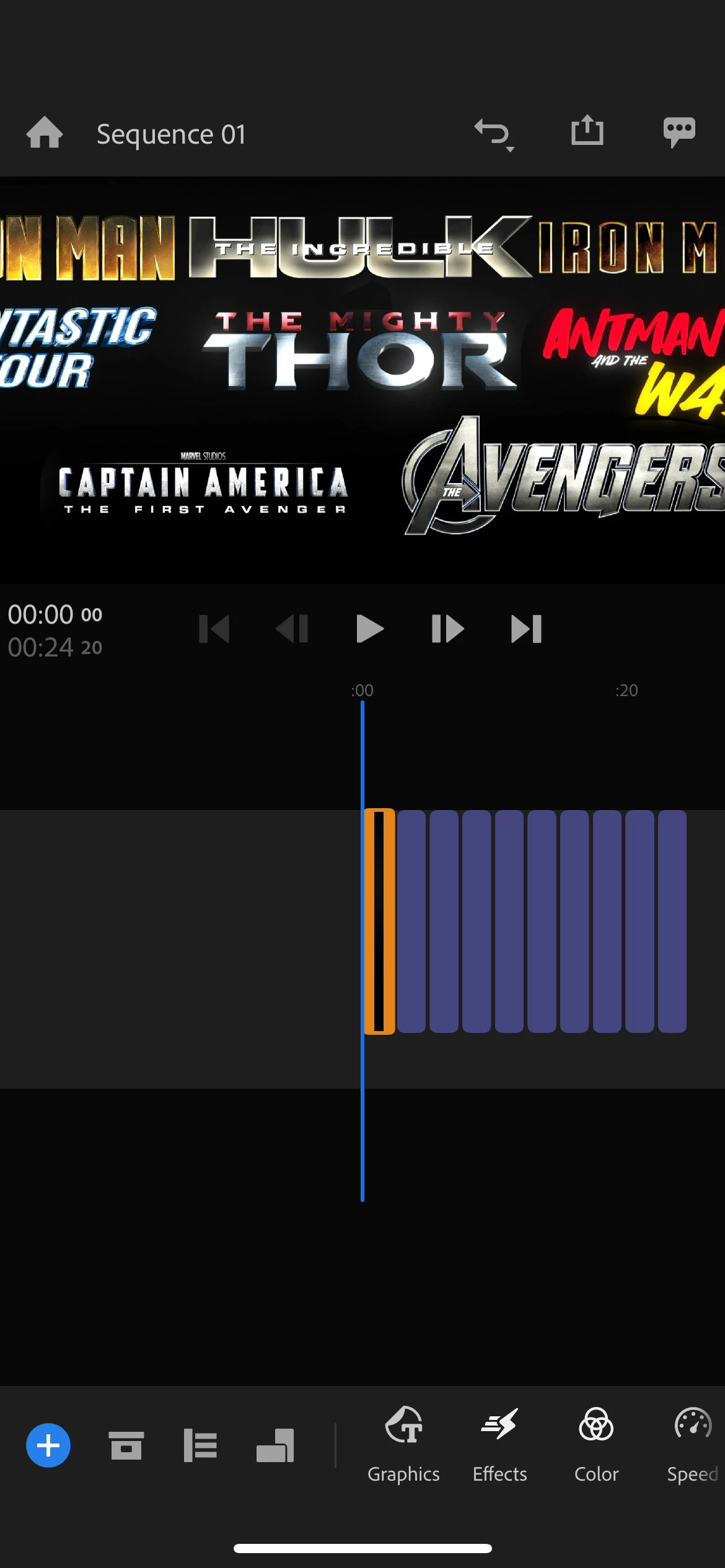
I was deleting unused assets in my project and I wanted to delete all unused assets so I selected it all and pressed delete unused assets, when it glitched and made my project into only ten repeating images with no audio. But the "used". Assets stayed in the asset library. The project took a year and a half, if I don't get it back I will be very angry, please please helps. There is an image attached to this of what my project became.

This topic has been closed for replies.

2 replies

Kevin J. Monahan Jr.
Community Manager
Community Manager
June 20, 2024

Hi @Seth38056078zogn,

I'm sorry that happened. I have the same issue with one of my projects (repeated still images). I considered taking the media offline and then relinking the footage one clip at a time via right-clicking and choosing Find and Connect. However, I am on the desktop version. That might be trickier with mobile. Our issues are likely due to project sync with Creative Cloud going by the wayside. It no longer exists. Sorry for the frustration. I hope the community can assist.


Thanks,
Kevin

Kevin Monahan - Sr. Community and Engagement Strategist – Adobe Pro Video and Audio
Participant
June 14, 2024

Evidence that all files are in the asset library just not in the video