Participant
March 8, 2022
Answered

Does Premiere Rush Compromise the quality and resolution of Photos when added to video reel?

  • March 8, 2022
  • 1 reply
  • 9222 views

Hi, 

I'm looking to create a slideshow-like reel of images to music and a voiceover, but I don't want to compromise the quality and resolution of the images.  My questions are: 


1. Is this possible with Adobe Premiere Rush?

2. If yes, what are the steps to do this? 

3. If no, is there a plan to alllow this in future/ what is the time frame? Trying to determine if it's worth holding out for Rush or if it's better to invest my time earning a program that better fits my needs


Thanks!

Correct answer caroline_edits

Hi there! This is definitely possible. What did you shoot your still images with? What device are you wanting to use Rush on?


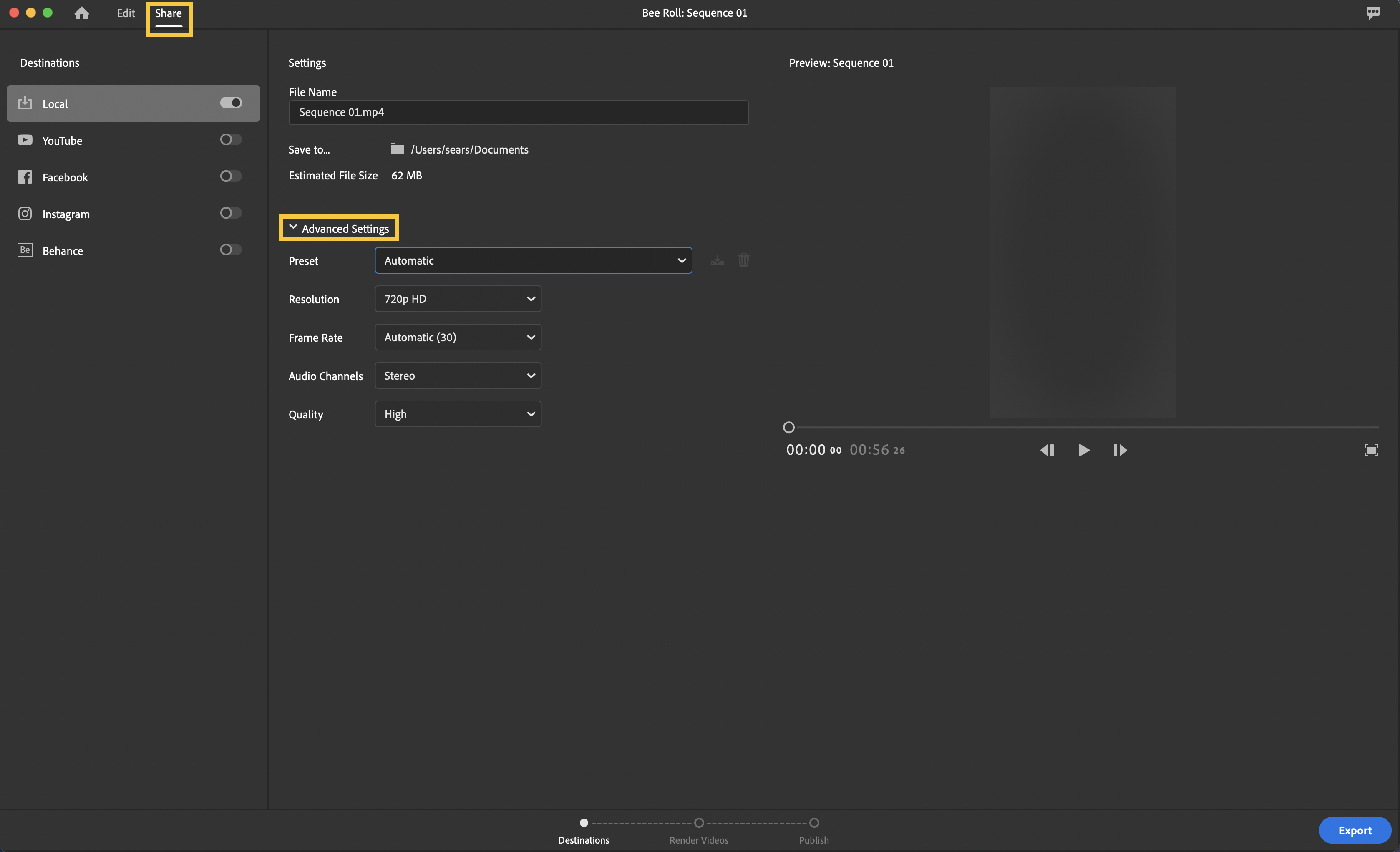
The quality of the final product will be dependent on the export settings you choose when sharing your video out of Rush. By default, Rush exports on an "Automatic" setting, which will probably compress your images and reduce quality in order to get you a smaller file size. We can change this!


If you go to the Share workspace and untwirl the "Advanced Settings" menu you can make sure the export setting matches the quality settings of your original still images. The exported file size will be larger and take longer to text to someone or upload to a social media site, but the images should look like they did before you imported them.


Hope this helps! 

1 reply

caroline_edits
Community Manager
caroline_editsCommunity ManagerCorrect answer
Community Manager
March 8, 2022

Hi there! This is definitely possible. What did you shoot your still images with? What device are you wanting to use Rush on?


The quality of the final product will be dependent on the export settings you choose when sharing your video out of Rush. By default, Rush exports on an "Automatic" setting, which will probably compress your images and reduce quality in order to get you a smaller file size. We can change this!


If you go to the Share workspace and untwirl the "Advanced Settings" menu you can make sure the export setting matches the quality settings of your original still images. The exported file size will be larger and take longer to text to someone or upload to a social media site, but the images should look like they did before you imported them.


Hope this helps! 

ahochkenAuthor
Participant
March 9, 2022

Thanks so much Caroline! 
The stills were shot using a sony a7iii; I'm using Rush on the desktop (so glad you offer both a desktop and mobile option, super smart!)

This is great to know! I am working on my first little set of projects, I'll keep this in mind when I wrap up 🙂


caroline_edits
Community Manager
Community Manager
March 10, 2022

Awesome! There will be minor compression probably but hopefully nothing noticeable as long as you toy with those Advanced Settings. Happy to help!