


caroline_edits
Community Manager
Community Manager
December 24, 2018
Question

FAQ: How to fade audio in Premiere Rush?

  • December 24, 2018
  • 12 replies
  • 204029 views

When you add music or a voiceover to your project, you might not want it to end abruptly. Transitions are useful for fading or merging between clips of audio or video.


1. Select the clip that you want to apply the transition to. Rush will display an orange border around the clip once it's selected!
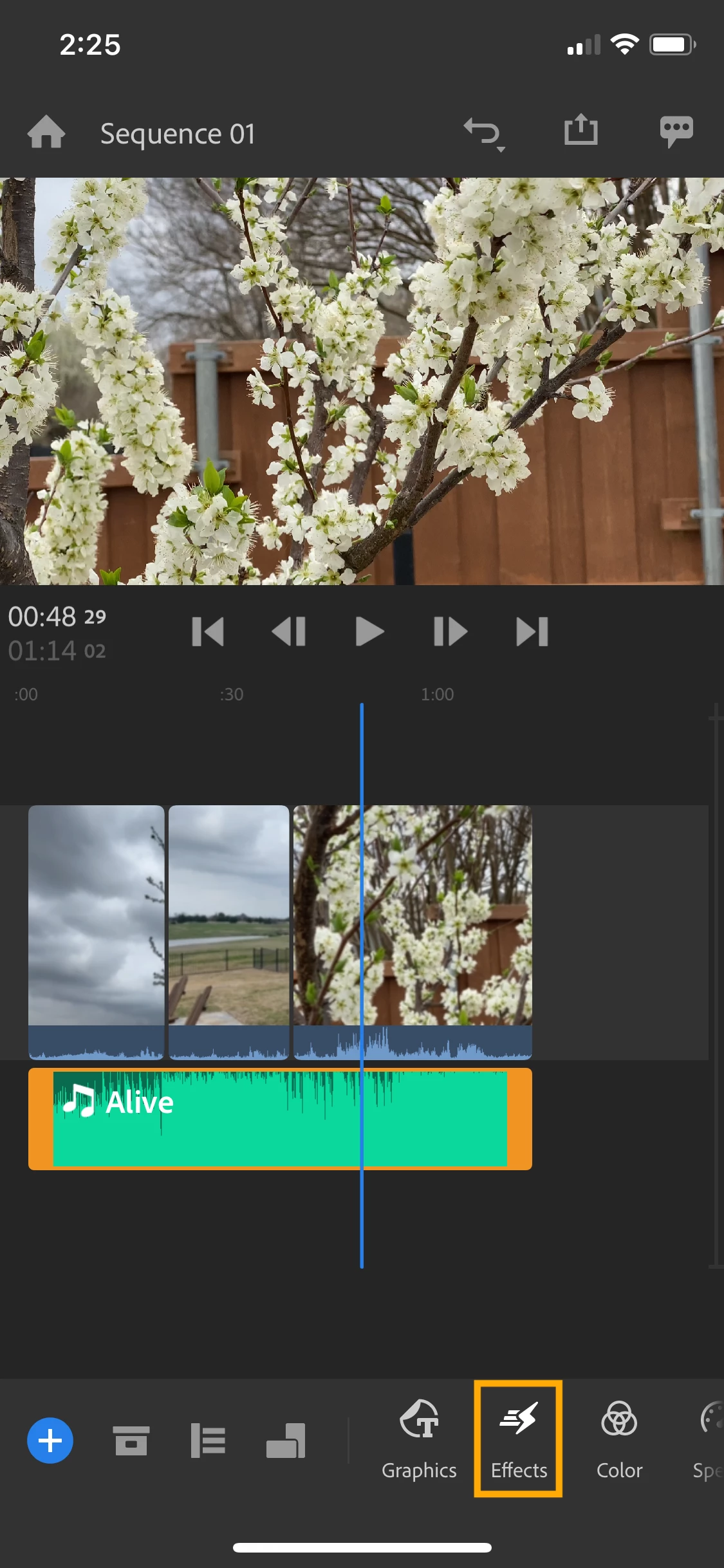


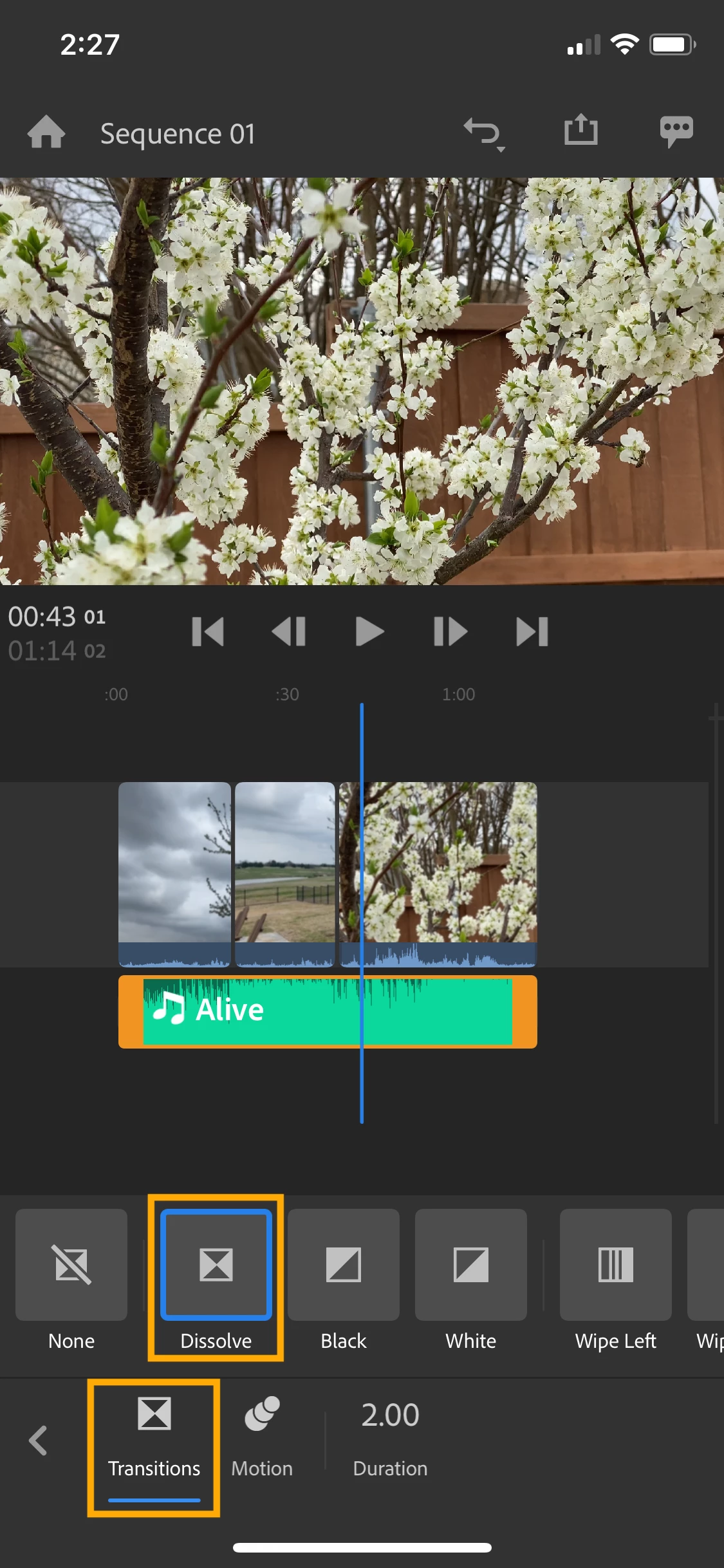
2. Select Effects from your toolbar to bring up your options. Select Transitions from the bottom row to see your transition options.

  • To fade audio, use dissolve 
  • To fade video, choose between dissolve, fade to black, or fade to white. You can also create a bolder transition using wipe, slide, or push in any direction.
 

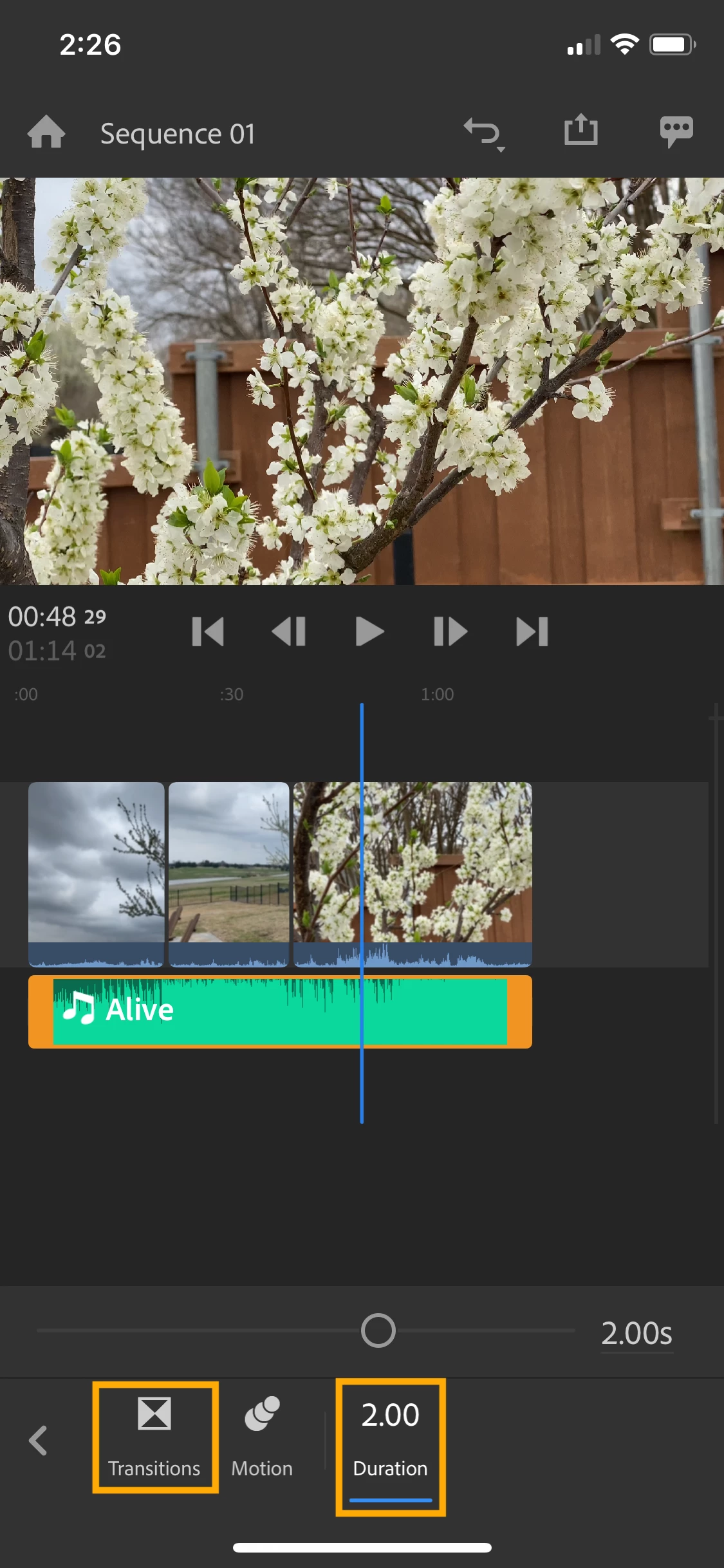
3. To adjust the length of your transition, select Transitions from your toolbar then select Duration.

  • If you move the slider to the right, the clip will fade in or out slowly.
  • Keep the slider to the left for quicker transitions.
  • On desktop, you can also select the transition in your timeline and drag the edge to lengthen it.


4. Rush will add the transition to the beginning and the end of your clip.

  • If you only want the transition on one end of your clip, tap the transition in your timeline and delete it using the trashcan icon in your toolbar.


Hope these examples help! If you have any questions, the fastest way to reach me is on Twitter @jaswest.

Talk soon!

Caroline 

12 replies

Participant
November 6, 2023

👍

Participant
December 8, 2022

Obrigada!!

Participant
June 26, 2022

Thank you Caroline!!!!

Participant
June 12, 2022

Perfect! Just what I needed. Thanks! 

Participant
May 7, 2022

A great free music app.

Participant
January 21, 2022

Thanks!


Crafty Stamp Co
Participating Frequently
November 20, 2020

THANK YOU THANK YOU THANK YOU!!!!! 

Participant
July 14, 2020

When I grab the transition it won't go anywhere in the mobile app? Why?

Participant
December 31, 2020

Where exactly is the "cross disolve" function?  or maybe it could be called "fade."

It ain't on my RUSH PREMIER program...no where can I find it.

Please give the exact path to this function... for example... click on Edit>Transitions>Cross Dissolve? whjch path is NOT on my Rush program

Then I would also expect to see a few more features that allow me to tweak the way the fade in or out of the .mp3 music file fades either in or out.

Also, one more question, how can I do voice over while the music (.mp3 file) plays gently in the background?

Thanks,

jim

Participant
March 23, 2020

Hi, I need this! I can currently do it in iMovie but not in Rush. I think it's very needed feature.

Thanks!

petergaraway
Adobe Employee
Adobe Employee
March 23, 2020

Hey pablitow,


You can apply transitions to an audio clip in Rush today.

1. Select an audio clip in the timeline,
2. Open the Transitions Inspector, select the Cross Dissolve transition

This will apply a transition to the beginning and end of your selected clip. If you want to apply a transition to only one side of the clip, you can drag and drop the transition to the desired position.


We're thinking of ways how we can make this more clear to users in the future.


Thanks,

Peter

Participant
November 6, 2020

It would help if it was more clear that you need to separate the audio track from the video before adding the transitions. Whole idea of having Rush is to make video editing simple for those of us who are not professionals in this area. Am I incorrect?


adam3k3
Participant
August 20, 2019

I recently exported a full DSLR video which consist of a single long clip sliced into peaces and connected together. The only audio adjustment I did was noise reduction 50% on the initial clip before editing. The final video came out with a problem of faded audio on the start of each clip. While editing, the same thing would happen from time to time so I thought its just editing buffer or something. I have only two transitions at the beginning and the end of the video.

The mentioned clip is: YouTube

You can hear the low audio after every cut as it starts low then picks up. Any help will be appreciated as Im planing to vlog using this on my trip without bringing the laptop but cant do so if this is somehow unfixable.

IOS 13 beta 6

iPhone XS

PS: I believe the same thing is happening on my Galaxy S9.

caroline_edits
Community Manager
Community Manager
August 20, 2019

Hi Adam!

My gut tells me it's because you're on a beta version of iOS 13. Don't believe our dev team has expanded support to that iOS just yet.

Can you export a portion of the project from your S9 and see if it's still happening there?

Let me know!

-Caroline