


Participant
August 12, 2021
Question

Files missing in Rush

  • August 12, 2021
  • 3 replies
  • 1153 views

Hi Guys! i am desperate working with rush. I edited some projects two weeks ago and some of them are looking like this: 
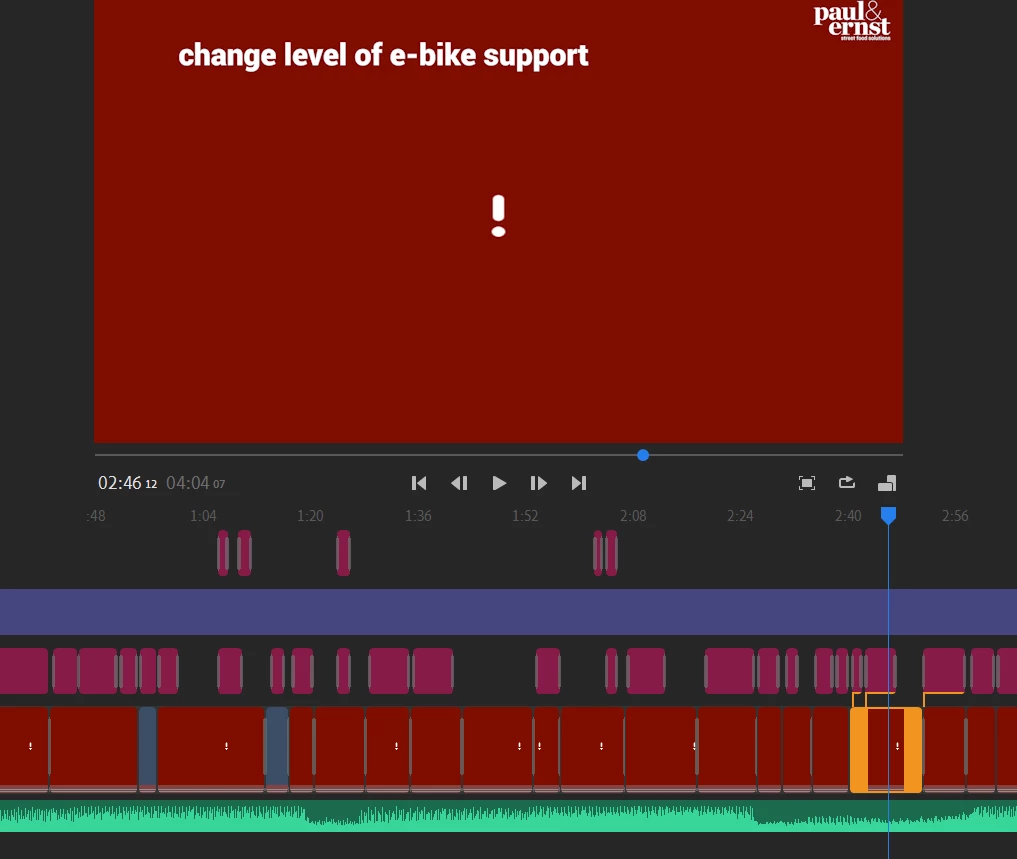
 

What happened here? we are working with google drive, and i dont get the mistake here. Other projects are just fine, where we also work with drive.

I did not delete any files...can someone help?

cheers Ben

This topic has been closed for replies.

3 replies

anissa_thompson
Community Expert
Community Expert
August 17, 2021

You can check for two scenarios:

1) Your project never fully finished syncing to Creative Cloud --> check for a blue circle link in the upper right corner of the project, next to the undo/redo arrows. Make sure it goes blue ALL THE WAY around, indicating that it's syncing; it'll disappear when all assets are uploaded and ready to use in the project.
2) You may not have deleted your project assets, but if you MOVED them before project fully synced, that would definitely cause the red frame missing assets indicators that you've shown. RIGHT/CONTROL Click on one of your clips, and look for the "Find & Connect" to point to your files' new locations.


Hope this helps!

Hope this helps! Make sure to press "✔ Correct Answer" on this post if this answers your question. Happy Creating!Anissa • @anissat
Participant
August 16, 2021

Hi Kartika!


Yes i did everything on the same device and nothing happens when i sync the project. Do you have any idea?

Kartika Rawat
Community Manager
Community Manager
August 13, 2021

Hi Ben!

Sorry about the issue. We can get this checked. 


Let us know.

Thanks.

Kartika