
Help? Rush crash yields some audio clips -now being empty (silence) - how to fix?
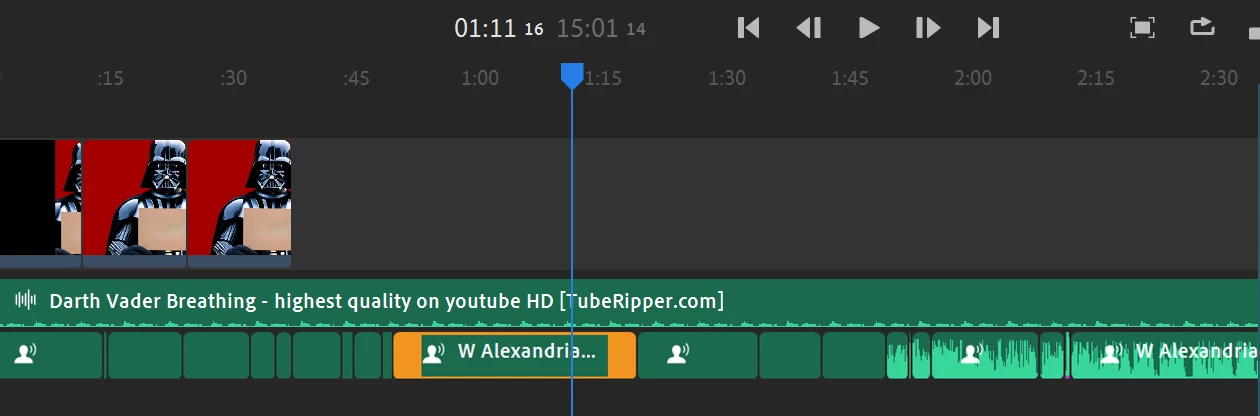
BLUF/TLDR: Today Rush crashed and I continued working and saving not realizing it had come back with SOME of the audio clips associated to a single source file showing as if they're pure silence. Investigating expected reasons why this would occur yielded that those reasons were not the reason why (missing source, or muted or..?). Can I fix these now 'broken' clips, & if so - how?
Analysis: When it crashed I was doing bulk modifications of "minimize echo, minimize background noise, enhance voice and auto volume". Sometime in that window the firsthalf dozen clips all from one source file zeroed out (made the audio inside the clip disappear). Other clips pointing to the same source show their audio & the source audio file remains in place - not having been moved. I can redrop it in and it plays the same audio that's supposed to be in those first clips just fine.
I do not see an option to resync those clips to their original source. I'm curious if the were individually corrupted in a manner overwriting their start &/or stop times associated to the source.
Regardless, How do I fix this?
Attached is the LOG & the screenshot of the empty audio clips.


 AdChoices