Participant
January 21, 2020
Answered

How can I delete videos locally from my IPhone in Premiere Rush

  • January 21, 2020
  • 2 replies
  • 4022 views

In my Premiere Rush App several old videos (which I don't need anymore) are saved locally on my IPhone. How can I delete these videos from my local IPhone memory?


Title edited by mod

This topic has been closed for replies.
Correct answer Kartika Rawat

Hi there!

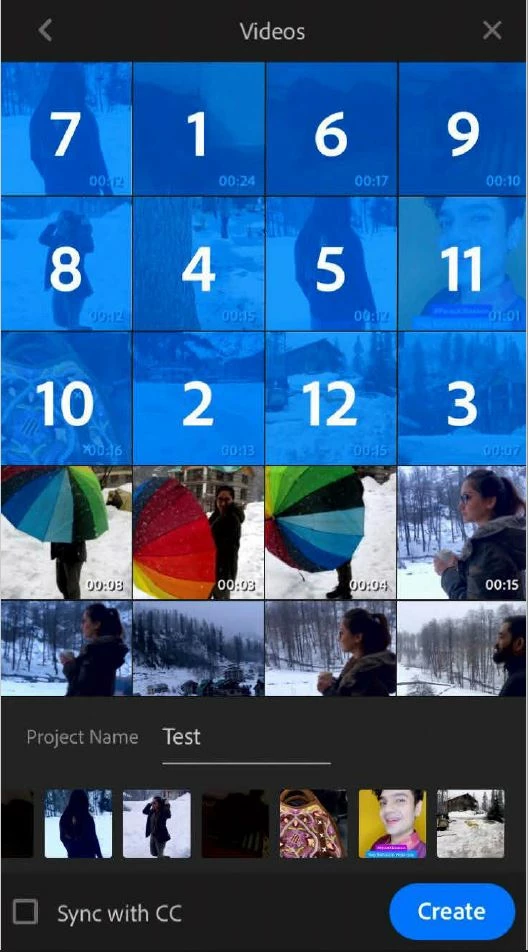
We appreciate you writing in. I understand that you want to delete the files from the path :

LOCAL > Videos. Am I correct?

Premiere Rush won't allow you to delete the video files that are saved in your library within the application. I am sharing a screenshot of my phone which I am assuming that you're getting too.

Let us know if you've any other questions.

Thanks,

Kartika

2 replies

Kartika Rawat
Community Manager
Kartika RawatCommunity ManagerCorrect answer
Community Manager
January 22, 2020

Hi there!

We appreciate you writing in. I understand that you want to delete the files from the path :

LOCAL > Videos. Am I correct?

Premiere Rush won't allow you to delete the video files that are saved in your library within the application. I am sharing a screenshot of my phone which I am assuming that you're getting too.

Let us know if you've any other questions.

Thanks,

Kartika

ToBeiAuthor
Participant
January 23, 2020

Many thanks Kartika,

you understood my probblem absolutly correct. Your screenshot was very helpfull. It shows exactly where I am getting to.

If Premiere Rush does not allow me to delete original video files which I don't use anymore (because I have already created a project out of them) how can I avoid that my IPhone's memory gets overflowed with these old files.

Do you know any other way to clean up my IPhones memory?

Participating Frequently
January 21, 2020

If you want to delete older Rush projects (not exported videos), click the three dot menu on the right hand side of your project and then choose Delete From Device.

 This will delete your Rush project. 


If you want to delete older video files that were exported to your gallery through Rush, you have to find them and delete them manually. 

ToBeiAuthor
Participant
January 21, 2020
Thank you for your quick response.
I know both of the described ways.

But what I don‘t know, is how to delete the original videos on my IPhone. I can see all of them, when I try to generate a new project. The old videos are saved under „local -> videos“ on my IPhone memory.
I can select them again to create a new project, but I cannot delete them.
I am happy with any new support.