Participant
Dec 3, 2018 3:42 PM UTC
Answered

How do you make still images longer?

I have found many videos that work for premiere pro but I have found none that work for premiere rush.

This topic is closed to new replies. Start a new post to keep the conversation going.
Meg The DogCorrect answer
Inspiring
Dec 3, 2018 3:59 PM UTC

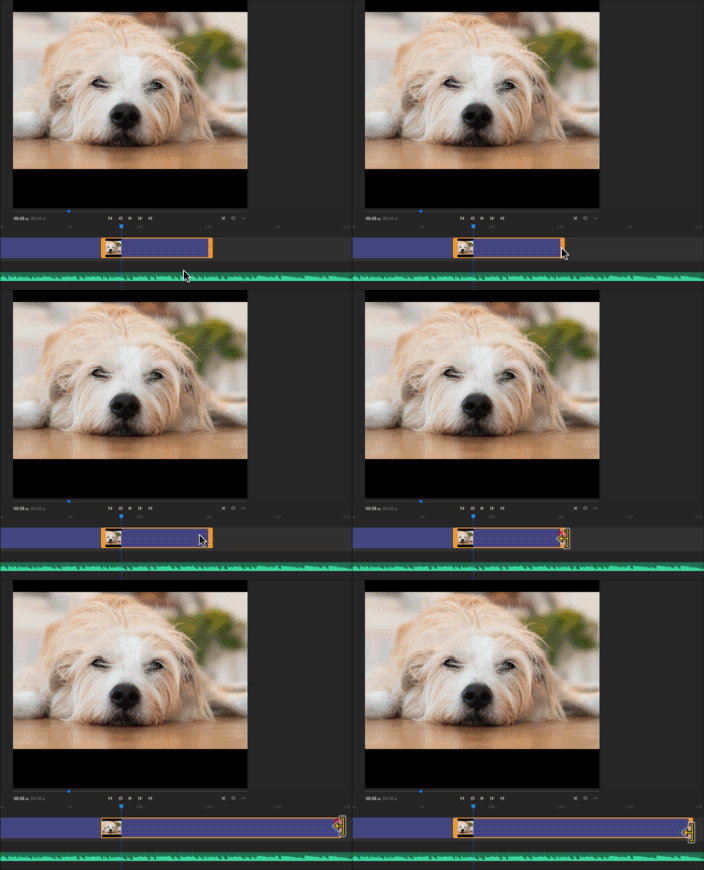
Are you asking how to increase the duration of the Still in the sequence? Click on the right edge of the clip on the timeline and drag it to the right:

MtD

15 replies

Participant
Mar 17, 2023 10:00 AM UTC

It worked for me if I moved the still to an empty track. Then a handle appeared on mouse over.

Translate
Participating Frequently
Mar 17, 2023 1:26 PM UTC
That totally worked. Thank you.
gary


Gary Alipio

Director of Marketing + Web Design

Academy of the Sacred Heart <>

4521 St. Charles Ave.

New Orleans, LA 70115

Direct 504.269.1252 | Cell 504.458.2525


Facebook <> | Instagram
<> | Twitter
<>


#1 Best Catholic & All-Girls High Schools in Louisiana, Niche.com
<>


For a virtual tour of our two campuses, click here
<>
Translate
Participating Frequently
Apr 5, 2022 8:09 PM UTC

I used to be able to add a Still > Add Effect Pan & Zoom and be able to stretch the length of the movement.


I upgraded to the latest Adobe RUSH and the ability to do so IS GONE.


Any ideas why? or did it move to SPEED


Translate
Participant
Jun 11, 2022 2:30 PM UTC

It moved to SPEED...ugh


Translate
Meg The DogCorrect answer
Inspiring
Dec 3, 2018 3:59 PM UTC

Are you asking how to increase the duration of the Still in the sequence? Click on the right edge of the clip on the timeline and drag it to the right:

MtD

Translate
nadinew9094672
Participant
May 14, 2020 9:37 AM UTC

Not working...


Translate
nadinew9094672
Participant
May 14, 2020 10:05 AM UTC

Found out: Doublecklick under the timeline then it`s working:-)


Translate