Participant
October 21, 2018
Answered

I am completely lost

  • October 21, 2018
  • 2 replies
  • 805 views

Hello,

Here is my story...

I wanted to purchase Adobe Premiere Elements but instead I somehow purchased Adobe Premiere Rush. In turn I didn't realise and so subscribed to the Adobe Creative Cloud thinking this would benefit the use of what I needed. Now I am at a stage where nothing has gone right and want to cancel my Creative Cloud subscription and perhaps get a full refund for the Premier Rush.

The problem is, I can not find anyone from the Adobe team to contact. No support number, no live chat, and simply no options when I select through the support pages. It suggests to select a contact option... but how is it possible when there is no options shown?

I feel like I am about to explode. So please, someone help me.

    This topic has been closed for replies.
    Correct answer Barb Binder

    Ok, let's try this:

    1. Open Adobe.com
    2. Sign in with your Adobe ID
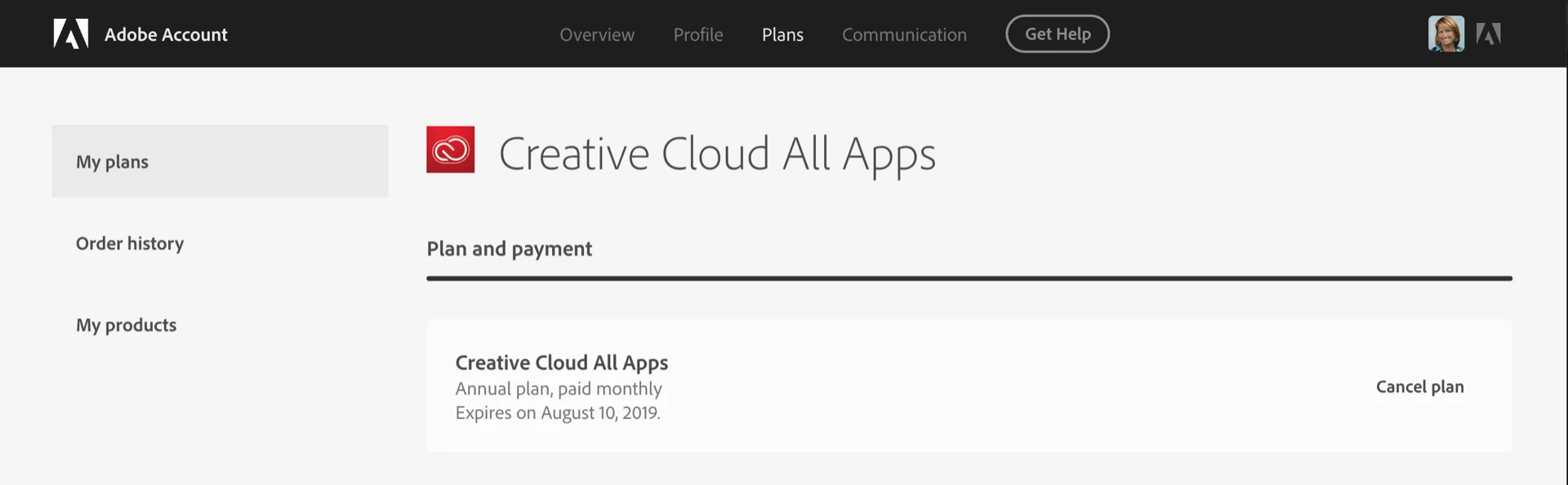
    3. Click on your avatar (top right) > Adobe Account
    4. Click Manage Plan
    5. Choose Cancel plan and follow the prompts

    ~Barb

    2 replies

    Participant
    March 24, 2020

    I need help on what buttons to push

    I have no idea what to do to try to edit a document from an email 

    Barb Binder
    Community Expert
    Community Expert
    October 21, 2018

    Hi Adam:

    This is the community forum—users helping users. To cancel your subscription, please visit Adobe's customer care page:
    Contact Customer Care

    ~Barb

    ~Barb at Rocky Mountain Training
    Participant
    October 21, 2018

    Hi Barb,

    Yes I am aware of that. However, when I follow the Customer Care link you have provided, I can not get though anywhere because it does not give me any contact options. Otherwise all the answers do not help either.

    Barb Binder
    Community Expert
    Barb BinderCommunity ExpertCorrect answer
    Community Expert
    October 21, 2018

    Ok, let's try this:

    1. Open Adobe.com
    2. Sign in with your Adobe ID
    3. Click on your avatar (top right) > Adobe Account
    4. Click Manage Plan
    5. Choose Cancel plan and follow the prompts

    ~Barb

    ~Barb at Rocky Mountain Training