
Image looks fine in review, but the resizes automatically if I grab or play the sequence
I have solved this problem, but had me tearing my hair out for a few hours and could not find an answer online.
So a still image looked good on-screen, but as soon as I grabbed and moved the scrub bar, or played it, the image just resized itself.... but again reviewed outside of that and the image changes back to it's 'correct' desired size. Soooo frustrating!
I had been 'playing' with Pan and Zoom and Auto Reframe in the effects palette for the first time. So I suspected it was something I did. It was the Auto Reframe, but I did not and do not find the controls on that at all intuitive! You have to switch Auto Reframe on with a toggle button, and although I decided not to use it, it seems it was somehow set... so when I went back to make some changes to a couple of images, it turned into the nightmare of automatically resizing my images! Behaviour was quite bizarre at times, with a repeated/duplicated image reverting back and forth depending on whether the other duplicate image was present in the next clip!... really odd.
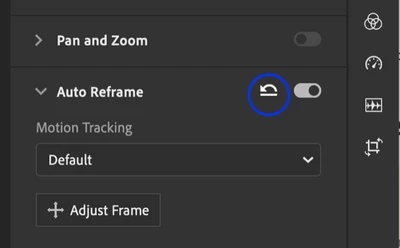
NOW... If you open Auto Reframe in the right menu, everything was greyed for me, so it didn't look like I could select or change it... but then later I noticed a backward arrow icon, and when I hovered over it the tool tip said, 'Reset to Default', which I clicked and it did the trick. See grab below.
Hopefully this will save somebody wasting hours trying to figure it out!... I'm going nowhere near that feature again!


 AdChoices