
Importing .mogrt Exported from Premiere Pro (25.0) does not work
Hello,
I have had motion graphic templates as .mogrt files used for a while. We recently updated our stock color palette and had a few that we used over and over that I wanted to make sure were updated. So, to be clear, they were made in Premiere Pro, not After Effects, around 2020-2021, following the same instructions from Adobe at the time. Now, when I follow the same steps in the latest version of Premiere Pro to a motion graphic that has the exact same properties as before, just changing the color, and follow the same steps, it refuses to load in Adobe Premiere Rush, giving me this error:
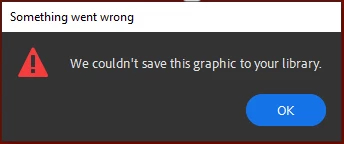
I have also tried adding them to a Motion Graphics Templates Creative Cloud library, and those do not load in Rush.
From this forum post: https://community.adobe.com/t5/premiere-rush-discussions/mogrt-not-installing-in-rush/td-p/12757540
The apparent workaround was to export from Premiere Pro v 15.4.3. That version is no longer offered through Creative Cloud (per the bottom comments from the same post), so there's no way for me to see if that would resolve the issue. Do custom .mogrts no longer work with the latest versions of Premiere Pro (25.0) and Premiere Rush (2.10) and there are no unofficial ways found by the engineers to fix it? If so, this feature should be removed from the product. It is also strange that Rush is no longer featured in the "Video" apps section of Creative Cloud.


 AdChoices