


claudio zavala jr.
Known Participant
January 27, 2019
Question

Media Upload Failed

  • January 27, 2019
  • 3 replies
  • 2699 views

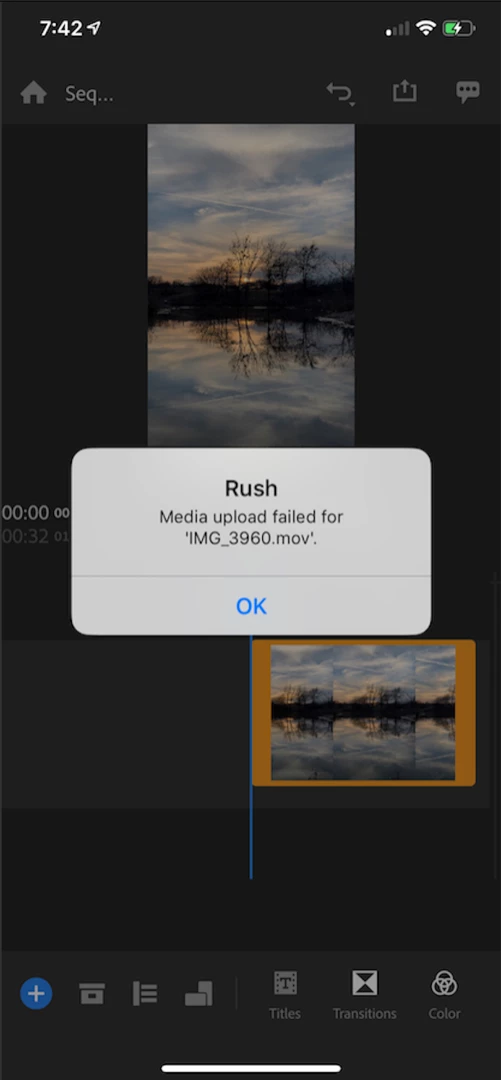
I create new project on my iPhone XS Max and add video. I work on project w no issue. I exit and return to the project. I get this weird error - Media upload failed for 'IMG_3960.mov.' I click OK & I'm able to continue editing the project. Somewaht annoying, especially when showing teachers how to use it. Any ideas why this is happening?
This topic has been closed for replies.

3 replies

itsbenjik
Participant
May 25, 2022

Has anyone found a solution for this?

None of my media, from any source and on any device, will upload. I can do everything just fine on one single machine (other than the errors every time I open the project) but nothing will sync to the cloud or the other computers.


To note, the PROJECT itself will sync. It just won't sync the media. So, I can open the Rush project on Pro desktop, and all the edits are there, and then I can locate the media files.


This seems to be 100% a creative cloud sync error.


Any other ideas?

Thanks!

Topher Welsh
Participating Frequently
February 3, 2020

I just encountered this. It seems there is a problem when uploading the footage via Creative Cloud when it syncs. I just restarted my device, and am keeping it on NEVER SLEEP, so there is no connection broken when the phone goes into sleep mode. I am monitoring the files in the app to make sure they upload, and everything seems to be working properly.

Also, I made a new Rush project and started from scratch doing this after I encountered the error. Lucky I hadn't started editing yet.

--------Topher Welsh
Participant
February 16, 2020

Ok I have been having a huge issue with this same problem. I finished 10 hours of editing only to have the rending fail due to this problem. I spent an hour+ on the chat with tech support and still nothing. 

What is the solution to this?? I can't have these types of issues. I manage a YouTube channel and I need this videos edited out and posted on time. 

Are there any Adobe employees here that can shed some light on this issue??? 

I'm doing everything on my iPhone XS running the latest software update. I need this issue resolved like yesterday. 

Participant
April 2, 2020

Yes I am please resolve this issue!!!! I am in the same situation not syncing to cloud yet ther is plenty of room. 

caroline_edits
Community Manager
Community Manager
February 7, 2019

Hi there, Claudio_Zavala!

I'm so sorry for the delay. Has Rush improved performance at all? What version of Rush are you using? Where did you get this footage from that's having a difficult time linking?

Let me know!

Caroline

claudio zavala jr.
Known Participant
September 19, 2019
Hi Caroline! It had improved but came up again today. I captured video in the Rush app and began editing on iPhone. I opened Ruse on Android. I can see project and preview of video. However, when I try to edit there is no video showing as I scrub. Went to sync to Cellular to try to fix it w no luck. Then switched back to WiFi & the error message returned. Seems like my video files are syncing in the cloud. Any idea?
claudio zavala jr.
Known Participant
September 19, 2019
Caroline, here’s link to video demoing the issue of no video showing https://share.icloud.com/photos/0ljAFrFZKudpU8MaS07uPKamg#Duncanville_High_School