

Improvement Dave
Participant
November 18, 2023
Answered

Premiere Rush crashes on export - PC

  • November 18, 2023
  • 1 reply
  • 924 views

Really not happy with this result. Conlcuded editing and export failed 7 times. Not excited about losing all this work.... Please HELP! dkolmer@naed.org


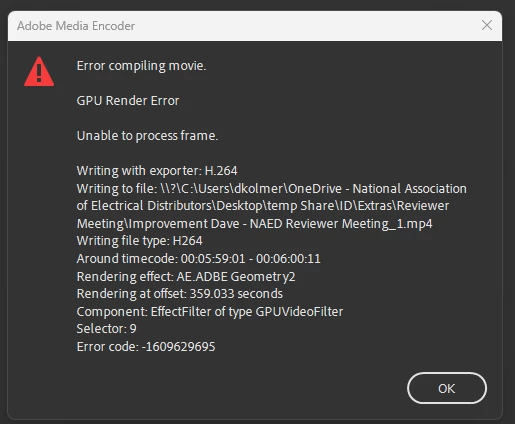
"Adobe Media Encoder
Error compiling movie.
GPU Render Error
Unable to process frame.
Writing with exporter: H.264
Writing to file: \\?\C:\Users\dkolmer\OneDrive - National Association
of Electrical Distributors\Desktop\temp Share\ID\Extras\Reviewer
MeetingMmprovement Dave - NAED Reviewer Meeting,l.mp4
Writing file type: H264
Around timecode: 00:05:59:01 - 00:06:00:11
Rendering effect AE.ADBE Geometry2
Rendering at offset 359.033 seconds
Component EffectFilter of type GPUVideoFilter
Selector: 9
Error code: -1609629695"
This topic has been closed for replies.
Correct answer Improvement Dave

Thanks, Kevin!, Yes, I was exporting to my desktop, which is backed up by OneDrive. That hasn't been a problem in the past. What I ended up doing was removing some of the elements where it always seemed to fail. A very large transparent PDF stencil for an effect I didn't need. That Didn't work so I removed another element that had text. That didn't work so I copied the music rights on the last slide to a new template and then that worked. I think that the text was not working because in the preview it didn't animate in correctly. I have been using the same template over and over for consistency in this project. Maybe that element or font was updated and no longer worked? Anyway, thanks for the response. I will try exporting to a folder that is not backed up by the cloud moving forward. best, Dave.

1 reply

Kevin J. Monahan Jr.
Community Manager
Community Manager
November 18, 2023

Hi @Improvement Dave,

Thanks for the screenshot. Try saving to another drive. You're exporting to your One Drive share. That might be a problem. Let us know if that helps.


Thanks,

Kevin

Kevin Monahan - Sr. Community and Engagement Strategist – Adobe Pro Video and Audio
Improvement Dave
Improvement DaveAuthorCorrect answer
Participant
November 21, 2023

Thanks, Kevin!, Yes, I was exporting to my desktop, which is backed up by OneDrive. That hasn't been a problem in the past. What I ended up doing was removing some of the elements where it always seemed to fail. A very large transparent PDF stencil for an effect I didn't need. That Didn't work so I removed another element that had text. That didn't work so I copied the music rights on the last slide to a new template and then that worked. I think that the text was not working because in the preview it didn't animate in correctly. I have been using the same template over and over for consistency in this project. Maybe that element or font was updated and no longer worked? Anyway, thanks for the response. I will try exporting to a folder that is not backed up by the cloud moving forward. best, Dave.