


ysw1216
Participant
December 12, 2018
Answered

PremierePro, Rush's Audio Track is strange.

  • December 12, 2018
  • 2 replies
  • 852 views

Audio track position is strange when 'Rush' is opened from 'Primary'.

In Rush, I can make Audio track only three.

when I open rush project in premierepro,

I can find Audio track 33.

Is there any other way?

everytime, Do I check A33 track in PremierePro?

Thank you.
    This topic has been closed for replies.
    Correct answer Meg The Dog

    When you open your Rush Project in Premiere Pro and find the added (empty) audio tracks, as a quick workaround until this is fixed:

    Right click on any audio track header (the blank space right of the mic icon is a good place to right click) and from the drop down menu choose Delete Tracks . . .

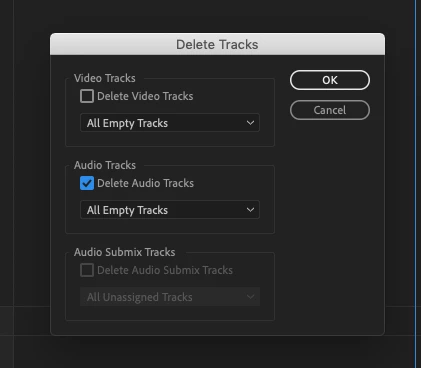
    When the Delete Tracks Pane opens,  check Delete Audio Tracks - All Empty Tracks and click OK

    This will remove the spurious audio tracks.

    MtD

    2 replies

    Meg The DogCorrect answer
    Inspiring
    December 12, 2018

    When you open your Rush Project in Premiere Pro and find the added (empty) audio tracks, as a quick workaround until this is fixed:

    Right click on any audio track header (the blank space right of the mic icon is a good place to right click) and from the drop down menu choose Delete Tracks . . .

    When the Delete Tracks Pane opens,  check Delete Audio Tracks - All Empty Tracks and click OK

    This will remove the spurious audio tracks.

    MtD

    ysw1216
    ysw1216Author
    Participant
    February 25, 2019

    thank you so much!!

    Participating Frequently
    December 12, 2018

    Hi ysw1216,

    Thanks for trying out Premiere Rush workflow in Premiere Pro and providing the feedback.

    Sorry for this confusion related to tracks in Premiere Pro. This is a known issue and we are working to resolve this.

    Meanwhile, please drag the audio from track 33rd to any topmost tracks manually.

    You can also submit feature requests for anything you would like to see in Rush here: https://adobe-video.uservoice.com/forums/916423-premiere-rush

    Keep highlighting your doubts. !

    We are continuously working to provide the best experience for our users.

    Glad to help,

    Mayjain

    ysw1216
    ysw1216Author
    Participant
    February 25, 2019

    thank you so much !