


Participant
Nov 27, 2018 7:42 PM UTC
Question

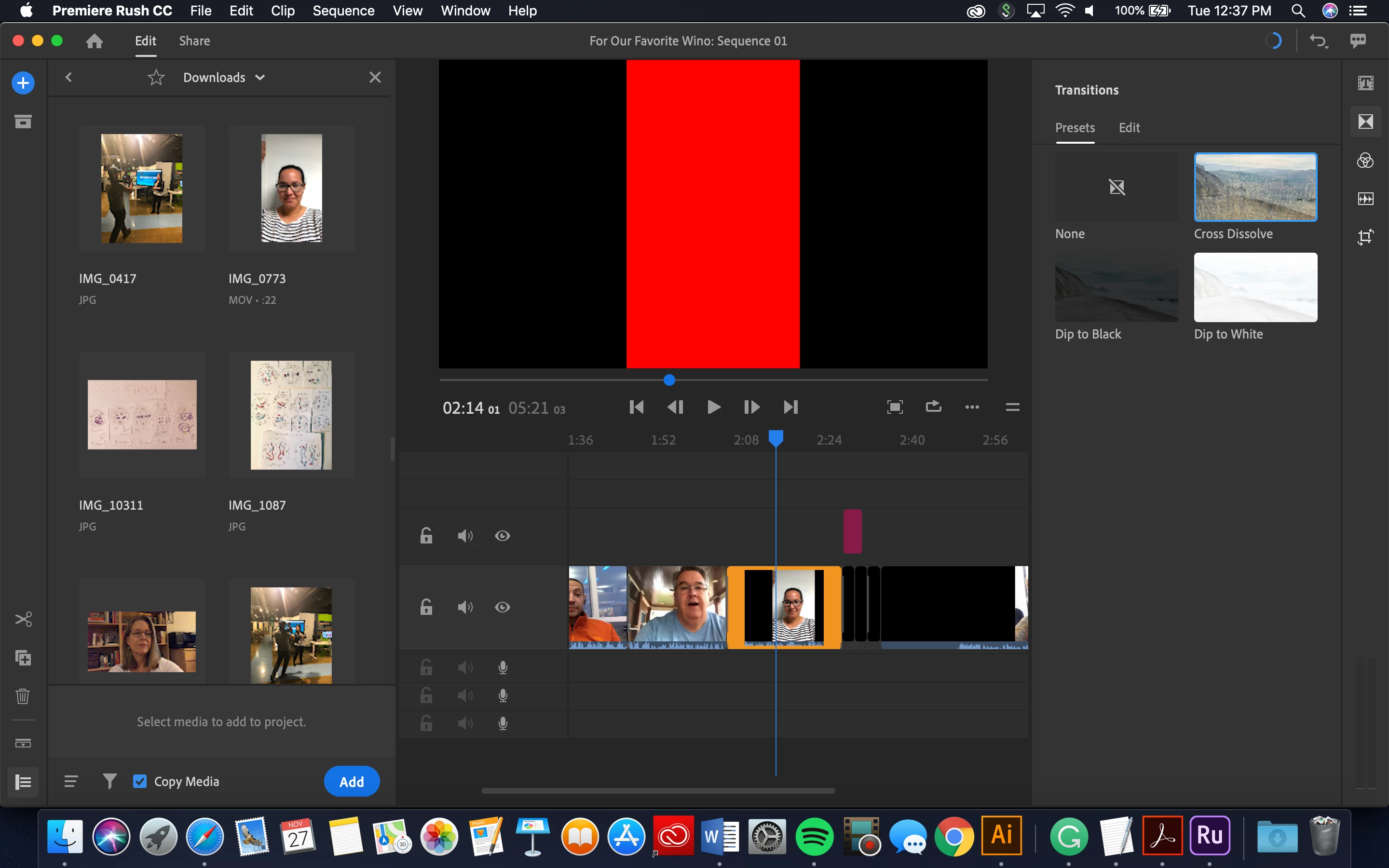
Red Screen Issue

Most people get the red frame with the explanation point. I however get this! And it's only been on this video so far. It plays solid through quick time. I even re-saved it through quicktime. So why is it not playing on Rush? This is for a well wishes video for our friend who has cancer and is going to the hospital in two days. Any expedited help would be appreciated! ❤️
This topic is closed to new replies. Start a new post to keep the conversation going.

12 replies

michaels41566241
Participant
Aug 8, 2020 6:13 PM UTC

I also have this issue. How can it be resolved?

Translate
Participant
Oct 30, 2020 9:04 PM UTC

Hey everyone, since nobody at Adobe could figure it out- googling this shows there seems to be a similar issue with Premiere Pro as well. And according to Premiere Pro, the solution for now is to go into settings and deactivate (uncheck) hardware acceleration- so just like Pro, in Rush, go into Preferences and look for the checkbox Enable hardware acceleration for encoding and decoding, and uncheck that. Then restart Rush and boom the red screen should not be there anymore.

Translate
Participant
Apr 16, 2021 3:34 PM UTC

YES! That worked. Thanks so much for the tip. 

Translate
Participant
Aug 2, 2020 10:40 PM UTC

I am also having this issue. Has this been solved?

Translate
caroline_edits
Community Manager
Community Manager
Nov 29, 2018 6:25 PM UTC

Hey, KCCK Graphics!

You're not the only one with this problem and we're spending some time this week to fix the source of the glitch. Could you answer these questions to get us on the right path?

1. Detailed computer specs? OS, GPU, CPU, the whole shebang. On a Mac, you can click the Apple logo in the top left corner, select "About this Mac" and screenshot the specs there.

2. What did you shoot the footage on? Would you mind if we got a copy of that file? If you could upload it to a file-sharing service like Dropbox or Google Drive, it'd be greatly appreciated.

3. What's your workflow? Did you create this project on your phone or computer? Which device does the red frame appear on?

Thanks so much for helping us improve our software! Best wishes to you and yours.

-Caroline

Translate
Participant
Mar 1, 2020 8:49 AM UTC

Please let me know when it is  fixed. its Mar 1st 2020 and I have lost a lot of time with this same issue now!! 

Translate
Participant
Apr 26, 2020 9:56 AM UTC

Did you get a resolution on this? I'm encountering the same thing 

Translate
petergaraway
Participating Frequently
Nov 27, 2018 9:58 PM UTC

Hi KCCK Graphics

First off, really sorry to hear about your friend. Thoughts and prayers to your friend!

A few things you can try:

1. Just export the video as is. Sometimes the red frame will not appear in the saved video.

2. If #1 does not, and it's not too difficult you can try starting a new project. On occasion, the red frame will not appear in a new project.

3. Lastly and maybe the best solution is using Handbrake or Adobe Media Encoder to transcode the problematic file and replacing your the original clip with the transcoded file. 

Handbrake link:

https://handbrake.fr/

If you need any additional help, please let us know.

Best,

PG

Translate
Participant
Nov 27, 2018 8:07 PM UTC

I did the updates this morning but I wonder if that might be effecting it somehow. :/

[Moved from the non-technical Lounge to the specific Program forum... Mod]

[Here is the list of all Adobe forums... https://forums.adobe.com/welcome]

Translate
cmgap
Community Expert
Community Expert
Nov 27, 2018 7:57 PM UTC

Do you have an update pending for Rush?

Translate