jamiltv
Participant
April 21, 2019
Answered

Rush 1:1 aspect Ratio from 16:9 video

  • April 21, 2019
  • 2 replies
  • 2728 views

Hi.

How can I crop to a 1:1 ratio and then only export the 1:1 portion of the video?

    This topic is closed to new replies. Start a new post to keep the conversation going.
    Correct answer Meg The Dog

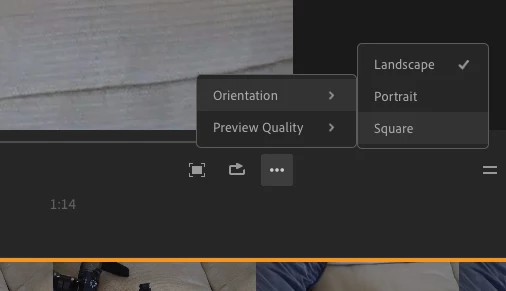
    In Project Assets, duplicate your sequence. Then, working on the copy of your sequence, switch the Orientation from Landscape to Square:

    and export.

    MtD

    2 replies

    Meg The DogCorrect answer
    Inspiring
    April 21, 2019

    In Project Assets, duplicate your sequence. Then, working on the copy of your sequence, switch the Orientation from Landscape to Square:

    and export.

    MtD

    mindfrog
    Participant
    March 13, 2020

    Hey can you please help me. How can you change aspect ratio to something else than landscape, portrait or square? For example 4:5 or 1.91:1 or 4:3 etc.? Didn't find this option from Rush, either desktop or iPhone app.