PhotoCrawford
Participant
July 29, 2020
Answered

Rush 1.5.20 can't access "Public" folder

  • July 29, 2020
  • 4 replies
  • 2355 views

When I try to open Rush 1.5.20 it prompts me to access my "public" folder in system prefrences>security&privacy. When the preferences pane opens there is no "public" for to grant permissions. Rush will not open without this. Operating with macOS 10.15.6. What to do???

This topic has been closed for replies.
Correct answer caroline_edits

We found another potential solution in our investigation! We can also try this.

1. Open System Preferences on your Mac and select "Sharing" 

2. On the "Sharing" page, check the box next to "File Sharing"

3. Set the permissions for your user account to "Read & Write"
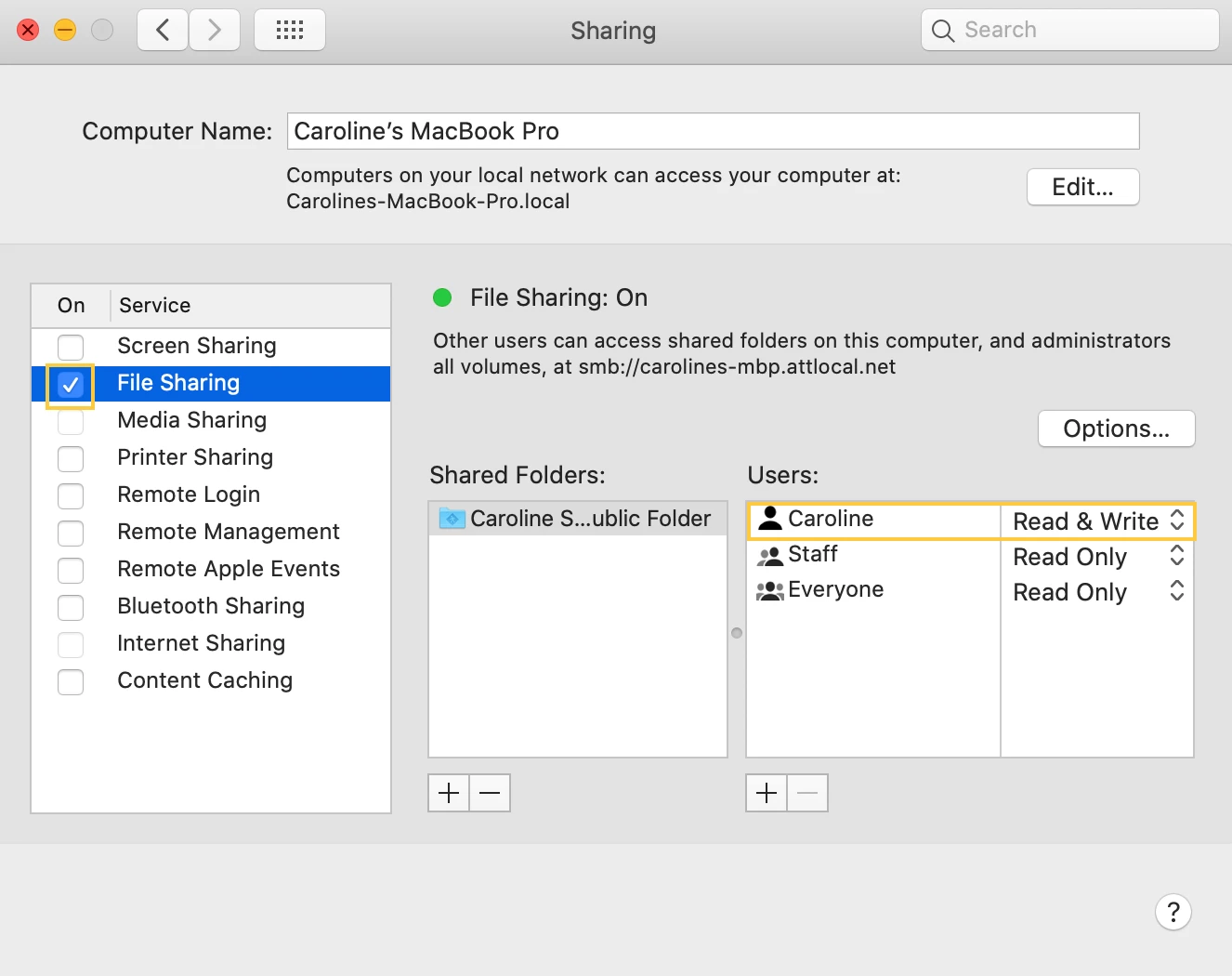
4. Uncheck "File Sharing" 

5. Restart Rush


Let us know if this works!

Caroline

4 replies

julianq87368538
Participant
May 14, 2024

thanks a lot, that was the problem, now it works totally fine

Participant
April 13, 2021

Hello,


I have this same problem and cannot find a solution yet.

It keeps saying "Premier Rush requires access to the following folder, Public"


Has anyone found an essy solution yet ? 

Please advise.


Thanks

petergaraway
Adobe Employee
Adobe Employee
April 23, 2021

Hi @Mahbub5C45 


To confirm, you tried the steps posted above, and that did not help? 


Thank you, 


Peter 

caroline_edits
Community Manager
caroline_editsCommunity ManagerCorrect answer
Community Manager
August 13, 2020

We found another potential solution in our investigation! We can also try this.

1. Open System Preferences on your Mac and select "Sharing" 

2. On the "Sharing" page, check the box next to "File Sharing"

3. Set the permissions for your user account to "Read & Write"

4. Uncheck "File Sharing" 

5. Restart Rush


Let us know if this works!

Caroline

Kartika Rawat
Community Manager
Community Manager
July 31, 2020

Hi there!

Let's get you back on track. I hope this helps with more info: https://www.howtogeek.com/443611/how-macos-catalinas-new-security-features-work/

In addition to this, you can refer to the link.


Let us know if that works. Happy to help.

Thanks,

Kartika


PhotoCrawford
Participant
August 8, 2020

Hello Kartika,


Please look at my question closer. In macOS 10.15.6 there is no "Public" folder. I'm having the same problem with Premiere Pro. Here is a thread that has the same problem UNSOLVED. https://community.adobe.com/t5/premiere-pro/premier-pro-requires-access-to-the-following-folder-s-public/td-p/11255661?page=1


I am unable to use either program causing me to lose two clients. Am I the only one with this issue?


Thanks

caroline_edits
Community Manager
Community Manager
August 10, 2020

This is definitely worrisome, thanks so much for flagging it! We have engineering investigating on their end as well.

As for next steps, here's what we can try.


Very sorry for the frustration. I wonder if you had any issues using Rush on any other devices? Have you tried the mobile experience? Does it give you similar permission errors?


Caroline
