
Trevert
Participant
May 11, 2020
Answered

Rush downloaded all onedrive files

  • May 11, 2020
  • 3 replies
  • 3154 views

Hi. Rush downloaded (or tried) all my onedrive files and ran out of space locally. I cannot find where they are located in order to delete them.

As far as onedrive is concerned, they are not local. They are either "sync pending" or "error". Can anyone help me locate them and/or fix this please.
Correct answer JCTwiist

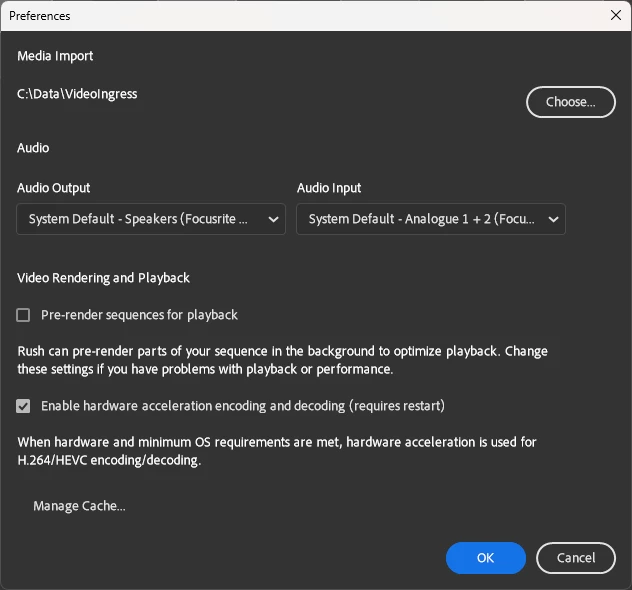
I figured it out it to do with your default ingress location. Pause OneDrive. Then open rush got to edit -> pref then under media import I would guess it will say that's in your OneDrive my docs folder. I create a folder on the root of me C drive "data". Then I cleared my cache just to make sure. This is what my settings now look like:


Unpause OneDrive and then let it update. It will probably upload a few pref files. That's fine. Then it should stop. 

3 replies

JCTwiist
JCTwiistCorrect answer
Participant
June 28, 2023

I figured it out it to do with your default ingress location. Pause OneDrive. Then open rush got to edit -> pref then under media import I would guess it will say that's in your OneDrive my docs folder. I create a folder on the root of me C drive "data". Then I cleared my cache just to make sure. This is what my settings now look like:


Unpause OneDrive and then let it update. It will probably upload a few pref files. That's fine. Then it should stop. 

Kevin-Monahan
Community Manager
Community Manager
June 28, 2023

Thanks for posting this. In general, you do not want to use any cloud based drives with any Adobe video editing application or situations like the ones mentioned can occur. This workaround shows how you can still use OneDrive for other situations while "walling off" the service from your video apps.


Well done!


Thanks,
Kevin

Kevin Monahan - Sr. Community and Engagement Strategist – Adobe Pro Video and Audio
Participant
July 13, 2023

Don't act like the issue is using cloud drives here. Any serious modern workflow includes keeping non-local drives for storage and local drives for working files. Cloud providers figured this out years ago and only require file metadata to be downloaded to navigate and discover folders and files. We can then CHOOSE to download the required files to our local drives to view/edit them as required.

For some reason, your updated interfaces ignore standard file management and instead wanted too implement your own, worse, interface. 


>In general, you do not want to use any cloud based drives with any Adobe video editing application or situations like the ones mentioned can occur. 


In general, you do not want to create your own file/folder interface that breaks how standard file/folder interaction works, or situations like the ones mentioned can occur.

Participant
February 13, 2023

FIX THIS ADOBE!
This is the dumbest thing ever. I can't even look through my files without Premiere Pro trying to download everything off of my Onedrive cloud to my SSD's... Certain things from onedrive are on my local drives, but I can't even look at those.

After Effects tried to do the same thing - though at least with that I could stop and import from my windows explorer. I am not sure why I can't import from Windows explorer in PremierePro. It is 2023, get it together.

Legend
May 11, 2020

The program won't download files from OneDrive unless you tell it to. The nature of Rush is that it links to files where they are located and saves its project files in the cloud. Linking to files on OneDrive should not impose on your device's storage space.

Participant
June 2, 2022

You are dead wrong about that. When I launched Premier Rush it for the first time it started downloading, seemingly at random, huge video files from Onedrive that I never asked it to. That slowed my system to a crawl.

justins29036261
Participant
July 14, 2022

How do we stop it from doing that? It keeps happening. Just started today...