Participant
November 15, 2021
Answered

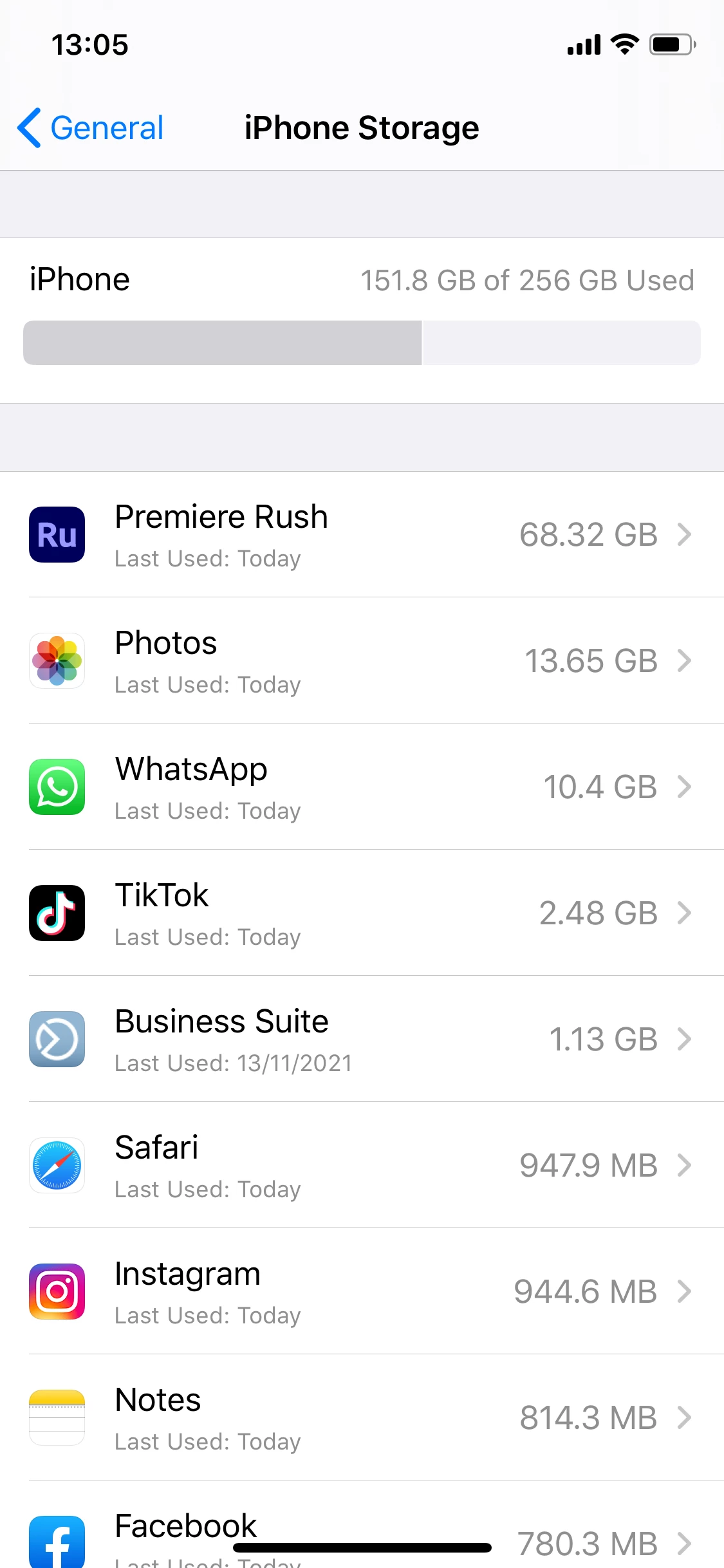
Rush has take 55 GB of my IPhone storage?

  • November 15, 2021
  • 4 replies
  • 2865 views

Hi, I am using Premiere Rush in my iPhone 11pro/256GB and it has take 68

GB storage from my phone I have deleted all big files. 

 How can I clear this 68 GB storage from my Rush app ?


Kind Regards 

Rohan Pawar

    Correct answer Tony29769603gcrg

    I believe that the issue is with iOS and not the specific app.  What's happening is that iOS is still relating files saved from Rush to the application.


    The fix that worked for me was to back the phone up to a pc.  For some reason a pc backup re-relates the files so they are associated with your Photos or Files space and not the app anymore.  


    It's been a while since I did it, but I recall that the files were already being backed up to iCloud through the Photos and Files applications, so fixing the relation issue didn't increase the storage usage of Photos or Files, since the data was essentially being backed up twice.

    4 replies

    Participant
    June 3, 2025

    for me, I delete the app and reinstall it. This works for me because I have 1-3 projects at a time and once I export it, i can delete the project in the app (but it doesn't remove the storage). So if you don't need all your projects within Rush, just delete the app and reinstall. Otherwise, there's no "clear cache" type of solution within the app 

    Participant
    August 20, 2025

    I deleted and reinstalled but it still left 24G of data (didn't change). Further help would be appreciated. iPhone 16 pro max

    Participant
    August 20, 2025

    Actually, I just "off loaded" the app. When I deleted it, all worked well and I have the 24G back. 

    Participant
    April 29, 2023

    Same problem here, 130GB taken on my iPad - removing the files and projects doesn't help.

    Tony29769603gcrgCorrect answer
    Participant
    May 7, 2023

    I believe that the issue is with iOS and not the specific app.  What's happening is that iOS is still relating files saved from Rush to the application.


    The fix that worked for me was to back the phone up to a pc.  For some reason a pc backup re-relates the files so they are associated with your Photos or Files space and not the app anymore.  


    It's been a while since I did it, but I recall that the files were already being backed up to iCloud through the Photos and Files applications, so fixing the relation issue didn't increase the storage usage of Photos or Files, since the data was essentially being backed up twice.

    Participant
    March 28, 2023

    Yes, I have the same problem where I have no projects on Rush anymore but it is still taking up storage on my iPhone 12 Pro, on latest ios. I am confused since I can't find a setting or place where it allows you to delete the data, so the only option this leaves me with is deleting the app. 

    Participant
    April 23, 2023

    Did you ever fix this problem?

    LinSims
    Community Expert
    Community Expert
    November 15, 2021

    Let me move this to the Premiere Rush forum for you, which is the appropriate forum for your question.

    The Using the Community forum is for help in using the Adobe Support Community forums, not for help with specific programs. Product questions should be posted in the associated product community.

    Participant
    April 23, 2023

    I have looked everywhere for this thread. Did you get an answer? Rush is taking 72 gb of my storage and I can't delete it.