Participant
October 3, 2019
Answered

Save as

  • October 3, 2019
  • 1 reply
  • 1556 views

Why is not Save as... still not implemented?
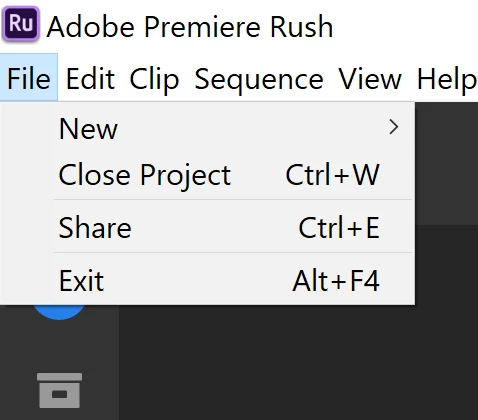
 

For me, this starts to be ridiculous. The simplest function for all types of editors is not implemented at all in Rush 

You always need to start from scratch with a new project, although you might only need to do a couple of minor changes in a large and time-consuming project.

How can adobe allow themselves to do this to a user?


It is not a serious product until this basic functionality is fixed and should have been done a long time ago.


It is really bad for the decision-makers that are responsible for developing the product. I would like to put that decision-maker through the same torture they do the users.

It is such a simple request that it should not even have to be raised. I don´t care if there is some underlying structure in the coding that prohibits this and if so they should put the whole project on ice since something then must be completely wrong in the structure.

I am paying full license prize to use all adobe products and expect that this issue is immediately fixed preferably by the end of this week so my time is not wasted.

Thanks for listening
    This topic has been closed for replies.
    Correct answer Meg The Dog

    You can easily make a copy of your project and make changes.

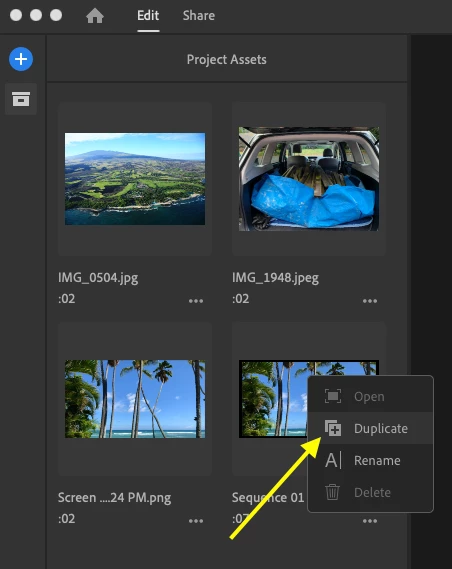
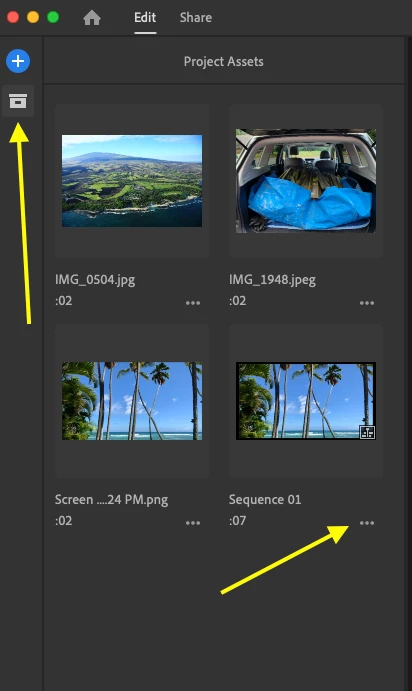
    Locate the sequence that you want to modify by going to the file box icon (the Project Assets) and clicking on it.

    Click on the three dots in the lower right of the sequence icon, and from the flyout menu choose "duplicate":

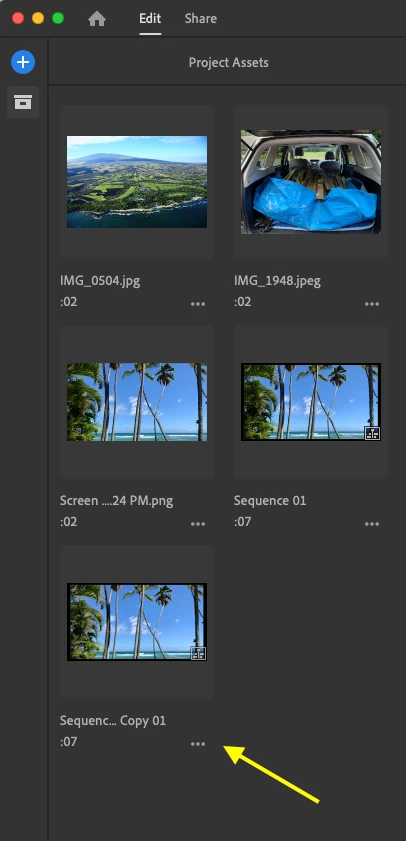
    This will create a copy of the sequence that you can modify as you wish. If you click on the three dots in the lower right of the sequence icon, you can rename this sequence from the default Original Sequence Name Copy:

    You can repeat this process to make multiple versions.

    MtD


    1 reply

    Meg The DogCorrect answer
    Inspiring
    October 3, 2019

    You can easily make a copy of your project and make changes.

    Locate the sequence that you want to modify by going to the file box icon (the Project Assets) and clicking on it.

    Click on the three dots in the lower right of the sequence icon, and from the flyout menu choose "duplicate":

    This will create a copy of the sequence that you can modify as you wish. If you click on the three dots in the lower right of the sequence icon, you can rename this sequence from the default Original Sequence Name Copy:

    You can repeat this process to make multiple versions.

    MtD


    Participant
    October 19, 2019

    I don't know if this is the same thing, but, suddenly, when I try to "save as," the format I change to is not longer also changed in the name of the file. So, if I decide to save a dng as a jpeg, I have to manually enter that format for the file name. Thanks.