thomasg29297715
Known Participant
January 7, 2019
Answered

Still photo audio video

  • January 7, 2019
  • 2 replies
  • 1059 views

Hi,

I am wanting to simply create an audio video of a painting that I've made and had scanned into a JPEG.

In addition to this JPEG I have around 6.5 mins of audio.

I have managed to assemble all these elements in Premier Rush successfully.

However, I want the still JPEG to be visible throughout the full duration of the audio. After around 2 seconds it disappears and the background goes black. How can I accomplish this?

Thank you in advance for your guidance.

    This topic has been closed for replies.
    Correct answer caroline_edits

    Hey ThomasG!

    If I'm understanding you correctly, I think you're just a little too zoomed in on your timeline!

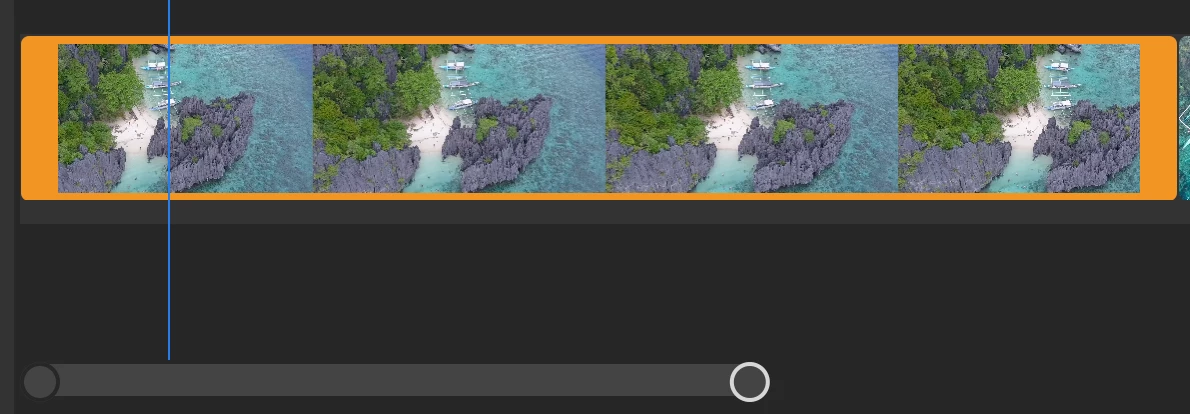
    If you can't currently see both ends of your JPEG, drag that bar at the bottom to scroll through your timeline, or grab one end of that bar to stretch it out to see your full clip!

    Let me know if that helps!

    Caroline

    2 replies

    toondiva
    Participant
    March 11, 2019

    I only have a single orange bar and I can't grab the edges, all I can do it duplicate it and I can't zoom in any more on the timeline to see if I can grab it. IS there another control I can use to extend my still?

    toondiva
    Participant
    March 11, 2019

    I finally got it large enough to see, got it!

    Participating Frequently
    January 7, 2019

    Hi psmart19,

    Welcome to the Premiere Rush Community.  Great to see your interest here !!

    You simply need to trim in/out to increase/decease the duration of the media files. Refer to this post :

    Re: How do you make still images longer?

    You can also submit feature requests for anything you would like to see in Rush here: https://adobe-video.uservoice.com/forums/916423-premiere-rush

    Keep highlighting your doubts. !

    Glad to help,

    Mayjain

    thomasg29297715
    Known Participant
    January 7, 2019

    Hi Mayjain,

    I see what you're saying. However, my JPEG appears as a single orange bar (you cannot see the whole image in the editing window, which is different from the link you have shared). I am unable to drag the edge of it when hovering over this bar with my cursor.

    How do you trim in / out the JPEG?

    Sorry to be a pain

    caroline_edits
    Community Manager
    caroline_editsCommunity ManagerCorrect answer
    Community Manager
    January 7, 2019

    Hey ThomasG!

    If I'm understanding you correctly, I think you're just a little too zoomed in on your timeline!

    If you can't currently see both ends of your JPEG, drag that bar at the bottom to scroll through your timeline, or grab one end of that bar to stretch it out to see your full clip!

    Let me know if that helps!

    Caroline