Participant
January 22, 2020
Answered

Syncing Audio and Video from separate sources

  • January 22, 2020
  • 2 replies
  • 14425 views

I have a need to use video of a person speaking and combing with audio captured from a lapel microphone and a separate file. 


Currently, it seems there is no way in Premiere Rush to sync audio and video captured from separate sources. It would be great if there was an easy way to address this problem. 

Correct answer caroline_edits

Hey Charles! I agree that Premiere Pro could be a little easier to use in this instance, but just in case you don't have access to it: 


Here's how I'd do this in Rush.

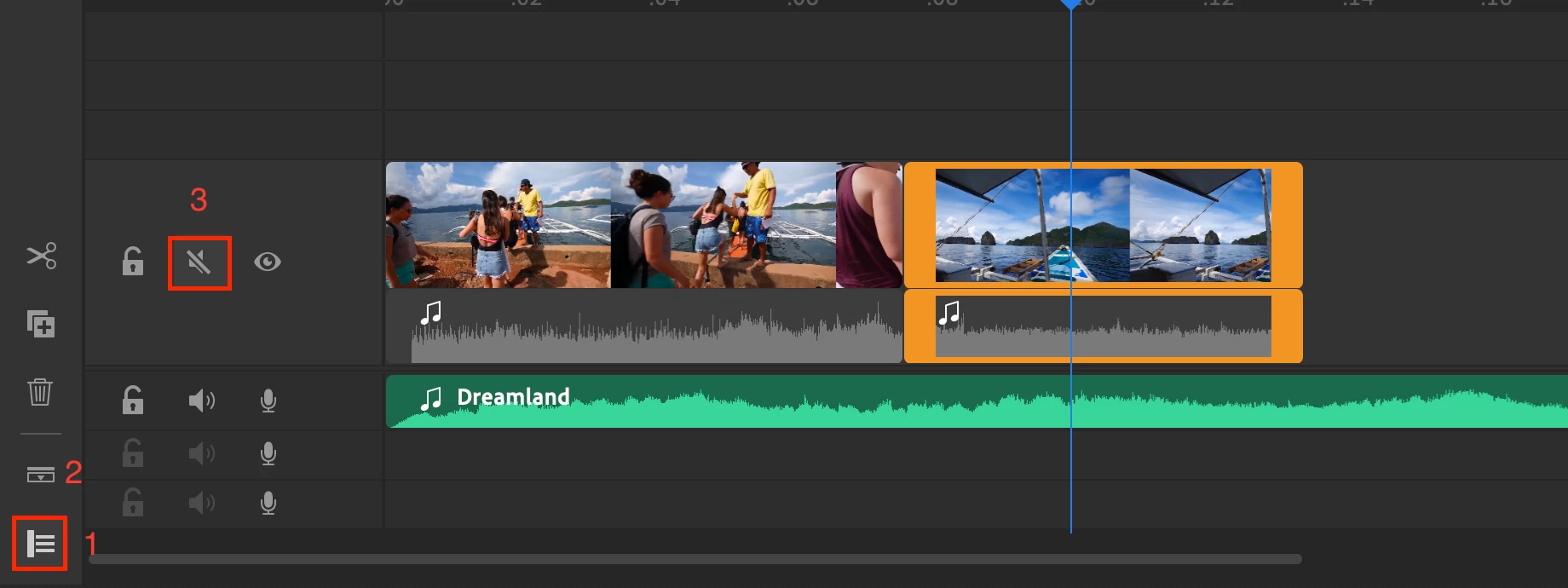
1. Import the video file as well as the audio file from the lapel

2. Put the lapel audio onto the track beneath the video and audio. Move the audio clip around on your timeline to sync it the best you can!

3. Mute the audio on the top track. Here's a screenshot!


Hope it helps.

Caroline 

2 replies

caroline_edits
Community Manager
caroline_editsCommunity ManagerCorrect answer
Community Manager
January 24, 2020

Hey Charles! I agree that Premiere Pro could be a little easier to use in this instance, but just in case you don't have access to it: 


Here's how I'd do this in Rush.

1. Import the video file as well as the audio file from the lapel

2. Put the lapel audio onto the track beneath the video and audio. Move the audio clip around on your timeline to sync it the best you can!

3. Mute the audio on the top track. Here's a screenshot!


Hope it helps.

Caroline 

Participant
January 27, 2020

Thanks, I'll try that. Still something I would like to see on the development roadmap. 

Ko.Maruyama
Community Expert
Community Expert
January 22, 2020

Currently there's no option to align waveforms in Rush.  If it's a different take, you're going to run into sync issues throughout the project anyway.  You're better off moving into PremierePro or Audition to finesse that matchup.... and even then, matching the two takes is not a simple feat.

Participant
January 22, 2020

Thanks for the response. 


Since Rush supports separate audio tracks and importing from different sources, this seems like a reasonable feature to include. Especially for the paid version. 

Participant
September 26, 2022

I agree Charles. At the very least, being able to "expand audio" on all audio sources would make it a lot easier. Right now it appears that one can only "expand audio" one source at a time. That makes it harder to align wave forms.