


Participant
February 22, 2023
Answered

Unable to Add Graphics in Premiere Rush

  • February 22, 2023
  • 7 replies
  • 27461 views

In the desktop app, when I click the blue plus sign to add Titles, Transition Graphics, or Overlays, I select the item (i.e. Basic Title 2-Line) I get the error: An error occurred during download from Adobe Stock server. Please try again. I have closed and re-opened Premiere Rush, and also signed out of my Adobe account and signed back in. Please help!
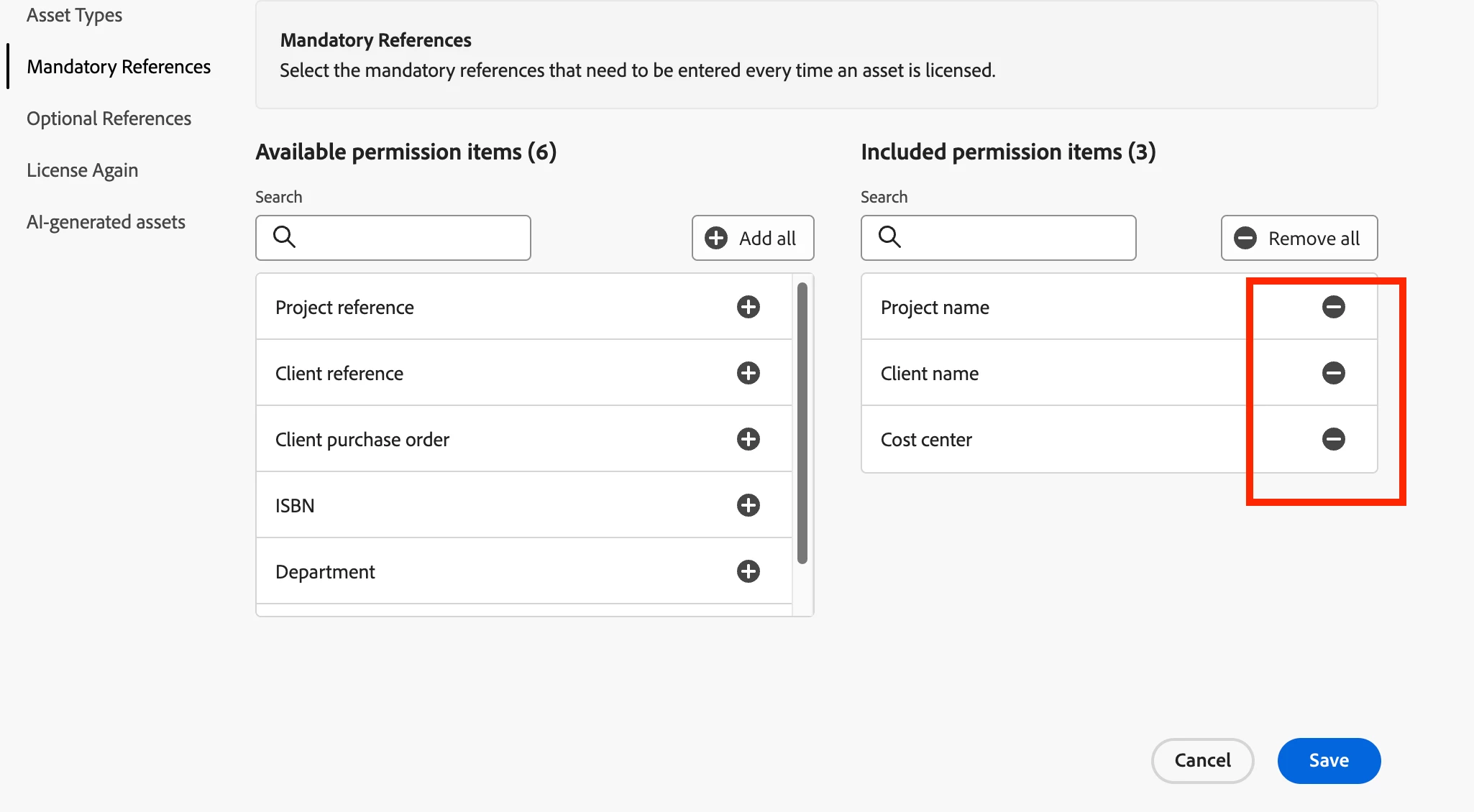
Correct answer defaultjan9z3cnln0f

I had this issue in our environment and it was due to mandatory permissions for the product profile in the Adobe Admin Console. It appears that you don't get the pop-up to enter these details like you would from the Adobe Stock Web portal. Once these were removed I no-longer recieved the error.

7 replies

Participant
September 22, 2023

An error message popped up when I went to add a template title to my video. 

The message says "An error occured during download from Adobe Stock server. Please try again."

defaultjan9z3cnln0fCorrect answer
Participant
July 31, 2024

I had this issue in our environment and it was due to mandatory permissions for the product profile in the Adobe Admin Console. It appears that you don't get the pop-up to enter these details like you would from the Adobe Stock Web portal. Once these were removed I no-longer recieved the error.

Participant
July 3, 2023

Im at the University of Sydney and a number of staff have been having the same issue.

Kevin-Monahan
Community Manager
Community Manager
June 7, 2023

Hi @Elizabeth5C40,

I read your message and you are saying you have no access to any of the graphics that come with Rush. That is terrible. As I understand it, only EDU users are experiencing the problem. I wonder what's going on there.


I just asked the product team for a response and to see if it can be fixed and I am awaiting a response. It may be due to a licensing feature that EDU admins need to install or a bug from our side. Let's see. I hope to hear back from them. Thanks again to you and others who have shared the issue. I apologize on behalf of Adobe for this shortcoming.


Thanks,
Kevin

Kevin Monahan - Sr. Community & Engagement Strategist – Pro Video and Audio
Participant
June 7, 2023

UPDATE: So I spoke with the Tech Support Department at Full Sail University today and they are aware of the issue as it has been an ongoing issue for quite some time. However, this is the solution they provided me to and it worked (so far):

1. Students must log into stock.adobe.com with their school credentials

2. Click on Templates in the top menu

3. Click on Motion Graphics Templates card (big card towards the right of the screen)

4. Select FILTERS from the left sidebar (should be first icon on the left side of screen)

5. Under APPS, select Adobe Premiere Rush

6. Mouse over the title you want (it should have a blue label saying Licensed on it), when small menu appears, select Re-Download for Free

7. Rember where you saved the .mogart file(s) 

8. Open Premiere Rush, click the Titles icon on the right then the three (3) dots and install template. 

That template should now work. 

Participant
March 23, 2023

New install of Adobe Rush. Signed in, Creative Cloud is running. Trying to add different motion graphic templates, and I keep getting the error: 
"An error occurred during download from Adobe Stock server. Please try again." 

Any suggestions? 

Participant
June 7, 2023

I am having the same exact issue. I am on my school supplied M1 Macbook Pro 16" and using the school supplied Adobe Creative Cloud account. I have tried EVERY title in Rush (desktop and on iPad) and get the same error. 


I'm not sure how accurate it is, but I heard that this service DOES NOT work for ANY school account (Adobe wants your money). I'm only using it for school (because I have to) but I have already purchased Davinci Resolve Studio 18 and will be using that instead of a subscription based software. 

Participant
March 5, 2023

I am having the same problem, did you get it resolved??


SnoxLuv4
Participating Frequently
March 5, 2023

 I not yet, I'm having to go slow cause I have Asperger's, Im very AWARE!!

Myra Ferguson
Community Expert
Community Expert
February 23, 2023

If it doesn't work when you try again, you might check the recommendations on the following page:

Participant
February 23, 2023

I checked my login, sync is done, all apps are updated, I'm connected to wifi. Might have to go to my admin at this point. Thank you!

Myra Ferguson
Community Expert
Community Expert
February 23, 2023

There's a link to Adobe Support at the bottom of the Troubleshoot sync errors page if you or your admin need additional help.

Myra Ferguson
Community Expert
Community Expert
February 23, 2023

I just tested to see if I could add that particular title, and it worked for me. I'm wondering if there was an issue with Adobe's servers when you tried. You might try adding it again to see if it works now.

Participant
February 23, 2023

It happened today and yesterday, so I don't think that's it.