


Participant
April 11, 2020
Question

Video cutting into half in Rush

  • April 11, 2020
  • 1 reply
  • 579 views

Hi,


I am not sure why the video is cutting itself in hlaf of it's size in the screen.

The actual video is squeezing itself into half of it's  original and half of the screen remains black in color.
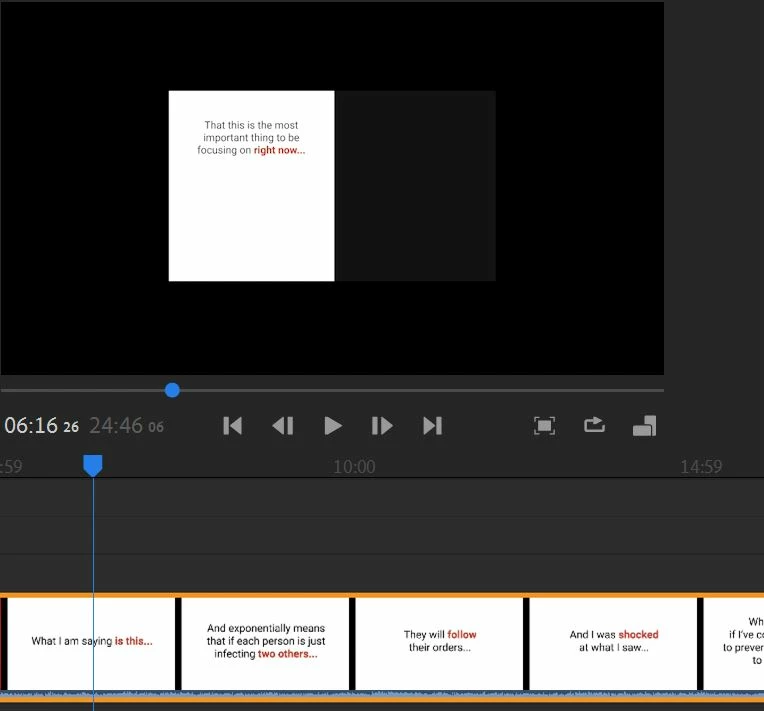
 

As we can see half video is white, and half is getting dark grey. Which should not be the case.

Entire screen is supposed to be white, as seen in timeline. 


I also tried upgrading my graphics driver to the latest, but still didn't help.


Please help.


Thanks


Title edited by mod

This topic has been closed for replies.

1 reply

Kartika Rawat
Community Manager
Community Manager
April 13, 2020

Hi Vivek,

This looks weird. Could you provide more info with us?

Looking forward to your response.

Thank you,

Kartika

Participant
April 14, 2020

It's v1.2.12


I never happened, this is the first time it's happening like this!

Am using HP Omen Gaming series laptop, which has i7 processor.

Kartika Rawat
Community Manager
Community Manager
April 15, 2020

Thanks for the information provided. I'd recommend you to update Premiere Rush to its latest version available on Creative Cloud. In addition to this, what happens when you disable Use Optimized Clips under Edit.

Let us know if it brings any change.

Kartika