Known Participant
January 12, 2024
Answered

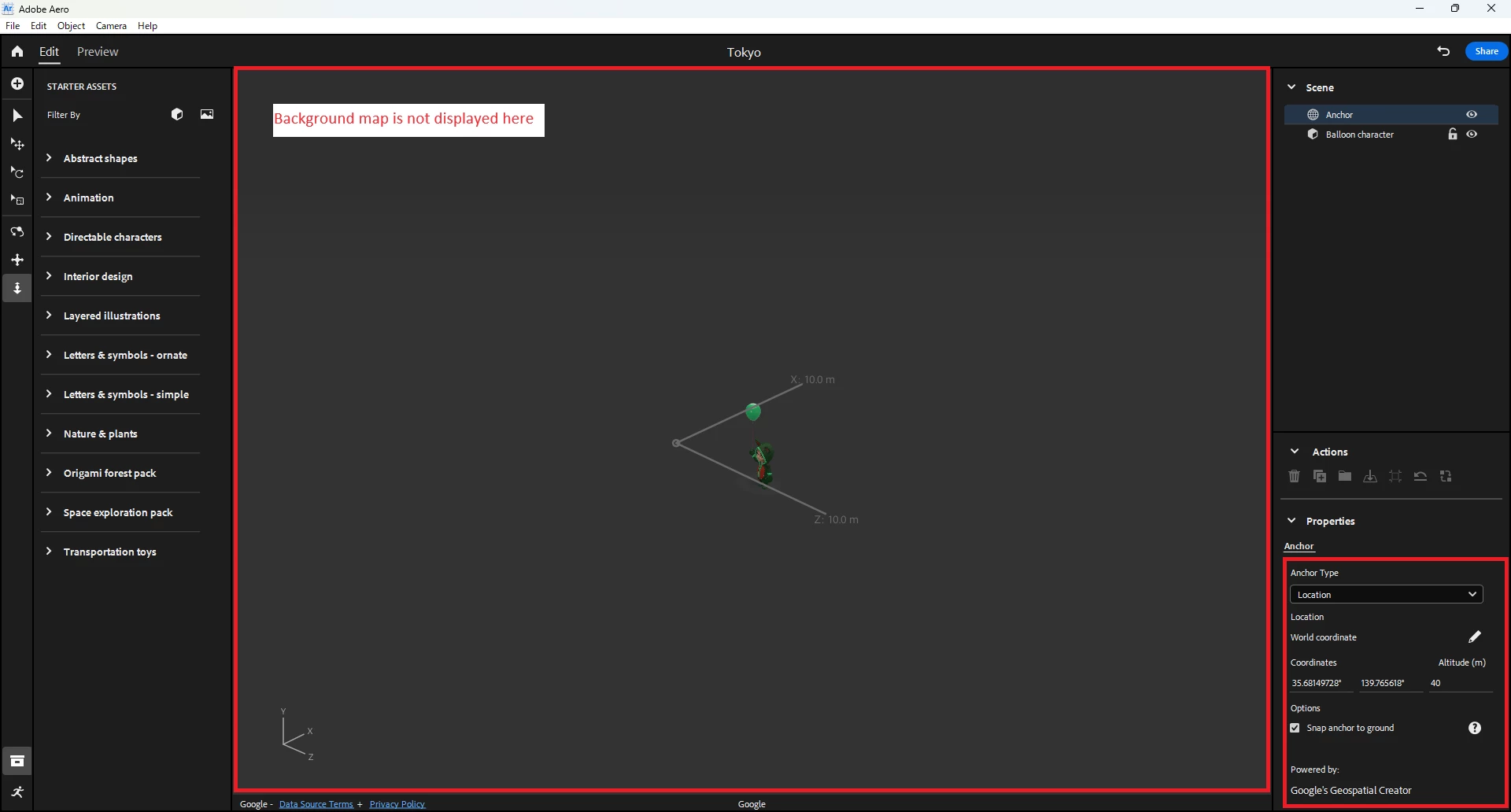
The 3D Google Maps Background is not visible anymore

  • January 12, 2024
  • 7 replies
  • 3731 views

Hello everyone! I've noticed that the 3D Google maps background, which was previously visible in the Geospatial creator in the location anchor, is no longer displaying. My current Aero version is Beta 0.23.4 (#127). I was wondering if any of you have faced a similar situation?


This topic has been closed for replies.
Correct answer julia_gmail

Here is a link to the discord channel.  https://discord.gg/vsm8xm5q

Once you are in ping the admin to invite you to the AERO geospatial beta channel.

I can't upload the patch here because the upload feature doesn't allow that file type.  Here is Discord message on how to change manually.  You can also google how to do it. "The proper fix is for Aero to shorten the names we use in our cache, and I will make sure we get this out in a release very quickly. In the meantime, if anyone wants a workaround, you can turn on the long path name setting by editing your registry using regedit and setting HKEY_LOCAL_MACHINE\SYSTEM\CurrentControlSet\Control\FileSystem\LongPathsEnabled to 1. "  

Hope that helps.

7 replies

Participant
April 9, 2024

Can someone repost a new Discord link? Thanks

Known Participant
April 10, 2024
Participant
October 13, 2024

Hello, Sai. I see this question was from quite a while ago. I'm still encountering same problem on OSX. I tried all discord links, but none were valid. Is the discord still active?
cheers,

Mike

Participating Frequently
March 9, 2024

Hola Team

Necesito activar adobe aero Geospatial, ya he rellenado el formulario varias veces, tengo casi 2 meses y no logro activar, ni me dan respuestas, alguien puede ayudarme con esto?


Saludos!

Participant
February 6, 2024

Is there still no fix to this? It won't show up on both my laptop and PC.

2 MacBook users I know don't have any issues with this.

Inspiring
February 6, 2024

Hi All.  A patch has been posted in the Adobe AERO Support Discord channel.  Google apparently made a recent change to the path name for the tiles which exceeded the standard Window path limit.  You can either go into to your set up and turn off the path limit.  Or install the patch which does the same thing for you.  AERO will fix this in an upcoming update.  Temporary patch is attached here

Participant
February 6, 2024

thank you! How can i join to the discord channel or get the download link to the patch?

Participant
February 6, 2024

Same issue, stills looking for a solution. Only the citys with 3d scan work but the flat ones look exactly like your capture

Inspiring
January 18, 2024

same.  everyone is having same issue - here and on discord.

Participant
January 13, 2024

Hello, I am experiencing the same issue. Will this problem be fixed?

Known Participant
January 15, 2024

@PerryB @sümeyye27657548bv88 So, it seems we're having the same issue. Currently, I still don't know the main cause of the issue. Without the maps, I think we can't use the location AR. Hope the Adobe team finds and fixes this bug in the next update. If any of you have a solution for this issue, please share me. I'll also update here if I find a solution. •ᴗ•

Participating Frequently
March 7, 2024

@Sai Victor did you find a solution for the Google maps on Adobe Aero?

Participant
January 12, 2024

Same for me