Participant
May 19, 2025
Question

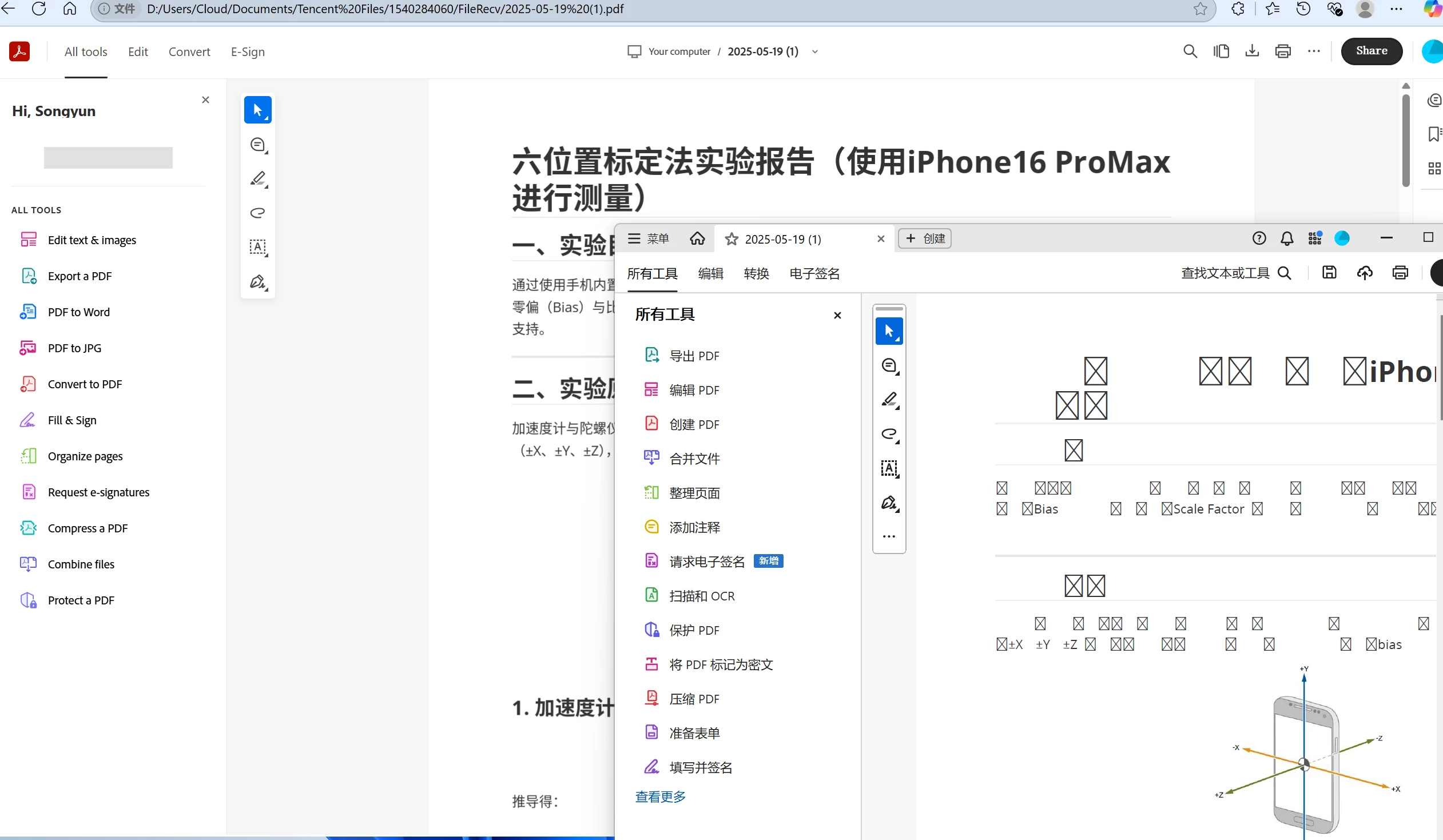
中文编码出现问题

  • May 19, 2025
  • 1 reply
  • 409 views

在浏览器中可以正常打开,但是在Acrobat Pro中打开时出现中文编码问题。请求帮忙解决这个问题。

1 reply

creative explorer
Community Expert
Community Expert
May 19, 2025

@Songyun_Zhang8775 that's a font issue. Web browsers often have better built-in font rendering capabilities or can dynamically download fonts. In your case, you need to download the fonts. Acrobat doesn't have the specific Chinese fonts from the embedded in the PDF or installed on your system. 

m
Participant
May 20, 2025

感谢您的解答。那我需要如何做才能确定该PDF使用的字体文件以便安装在我的系统中,并在acrobat pro应用程序中使用呢?

AnandSri
Legend
May 20, 2025

Hello @Songyun_Zhang8775!


I hope you are doing well, and thanks for reaching out.


++ In addition to what our community product expert has shared, you need to identify which fonts the PDF is actually using (and whether they’re embedded) so you can install any missing ones on your system. 

Check via Document Properties

  • In Acrobat Pro, open your PDF and go to Menu→ Properties, then click the Fonts tab.

  • You’ll see every font the PDF references, and whether it’s Embedded or Embedded Subset.

  • Note any Chinese fonts listed (e.g., “SimSun,” “MS Song,” “PingFang-SC”).

Generate a Detailed Font Report with Preflight

  • Go to All Tools → Print Production → Preflight.

  • In the dialog, search for “List all fonts” or use the PDF Analysis profile.

  • Run it to produce a report showing font names, encodings, and embedding status.

Install Missing Font Files

  • Once you know the exact font names, download the corresponding .ttf or .otf files from a trusted source (e.g., your font vendor or Adobe Fonts).

  • Install them on your operating system:

    • Windows: Right-click the font file → Install.

    • macOS: Double-click the font file in Font Book → Install Font.

Please ensure you have the latest version of Acrobat installed on the machine: 25.001.20474 (Win) | 25.001.20476 (Mac), Apr 28, 2025. Check for any pending updates from the Menu > help > check for updates, install the updates, restart the app and the machine, and try again.

See these articles to know more about PDF fonts, embedding fonts in a PDF, and using the Preflight tool for fix-ups: 

https://adobe.ly/4juNjsZ

https://adobe.ly/4jfdzXP


If you still see encoding issues after installing the fonts, ensure the PDF export from the source application correctly embeds the fonts (or ask the PDF’s creator to re-export with full font embedding enabled).


I hope this helps.

Thanks,

Anand Sri.